
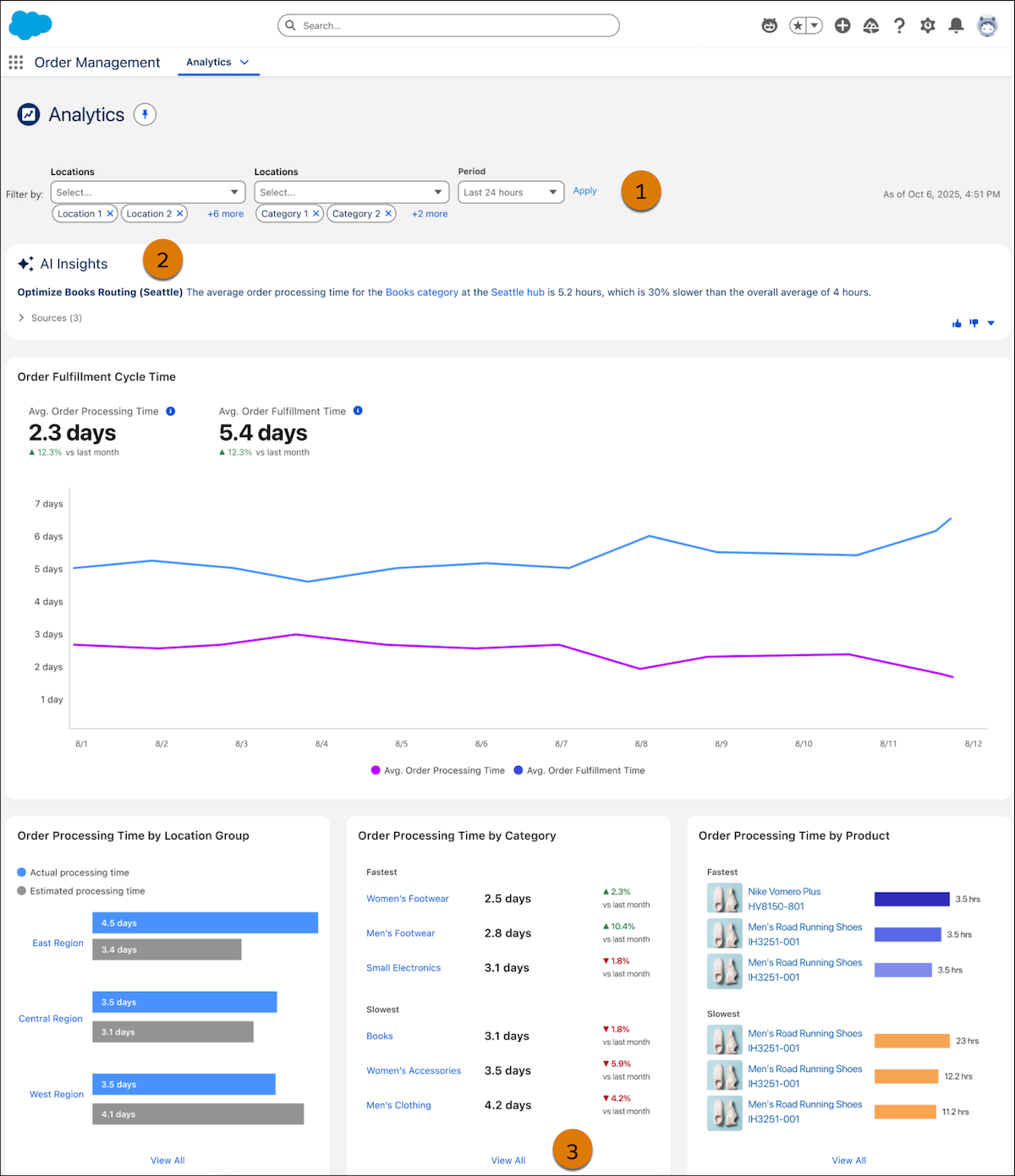
The Order Management Analytics dashboard provides key metrics across the order fulfillment lifecycle. Use AI-generated insights to enhance decision making for your order management operations with real-time, unified data. Create data streams to bring Order Management data into Data 360. Then connect your Data 360 license to Order Management to create calculated insights for order fulfillment performance.
Required Editions
| View supported editions. |
The dashboard has two tabs:
- Orders - Monitor active orders in flight, stuck orders, revenue at risk, cancellations, and returns across your fulfillment network, with breakdowns by location, status, and root cause.
- Processing Fulfillment Time - View AI-powered calculated insights and pinpoint locations that require operational review to enhance efficiency and order fulfillment performance.
Before using Order Management Analytics, confirm that your org has these prerequisites:
- Turn on Data 360, set up an admin user, and connect the source Salesforce org to Data 360.
- For B2B Commerce stores, Set Up Data 360 for B2B Commerce and Enable Einstein Generative AI and Agents for B2B and D2C Stores.
- For B2C Commerce storefronts, Provision a B2C Commerce Connection and then set up a B2C Commerce Connector. Then Enable Einstein Generative AI.
The Order Management Analytics dashboard and calculated insights are available if you have Data 360 provisioned with an OM Growth license. Data 360 and Einstein Generative AI power calculated insights.
To get AI-powered calculated insights, set up a data stream between Order Management and Data 360 by using convenient data kits. See Share Data Using Order Management File-Based Data Kits. Then you can turn on the connection between Data 360 and Order Management to access the dashboard and calculated insights. See Enable Order Management Analytics. To refresh the data on your dashboard, visit calculated insights in Data 360 and republish.

- Enable Order Management Analytics
Connect your org’s Data 360 license to Order Management to access the Analytics dashboard and create and view calculated insights. - Agentforce Proactive Fulfillment Alerts
Stay ahead of supply chain volatility by transforming insights from the Analytics Dashboard into actionable recommendations. Agentforce continuously monitors fulfillment orders and triggers proactive alerts when it detects fulfillment risks by evaluating real-time disruptions like weather alerts and operational inefficiencies, such as processing delays, workflow or lay out issues. Use these recommendations to trigger autolaunched flows so that Agentforce can temporarily exclude specific locations and reroute existing allocated orders or update the processing time of slower locations to mitigate delays before they affect the customer experience. - Order Analytics
The Order Analytics dashboard gives you real-time visibility into active order workflows, delays, and financial risk across your fulfillment network. It brings together summary metrics, status breakdowns by fulfillment location, and root-cause analysis for cancellations and returns, so your team can act on order delays and reduce lost revenue. - Enable Slack Notifications for Order Management Analytics
Act on insights and recommendations directly from Slack. The Salesforce Order Management app delivers at-risk location notifications to your designated Slack channel.