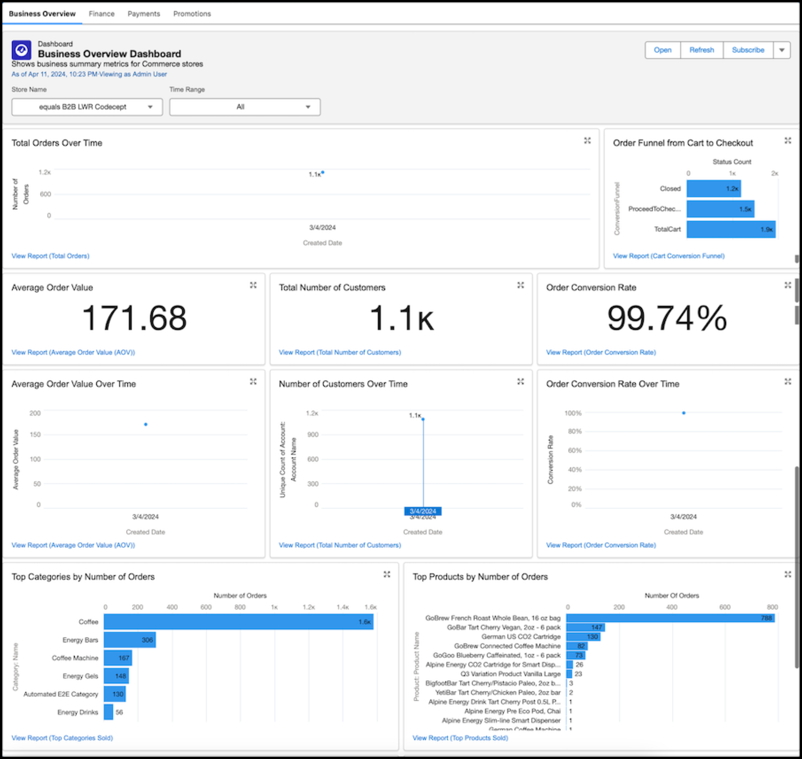
Use the Commerce Analytics dashboards to monitor business performance in B2B stores.
Required Editions
-
Click
 at the top of the page, and then select Commerce Setup
Assistant.
at the top of the page, and then select Commerce Setup
Assistant.
- In the Salesforce Commerce Setup tile, click View Details.
-
On the Additional Setup tab, locate Dashboards and Reports. Click Install
Dashboards.
To check the status of the installation, refresh the page.
- Go to your store’s home page, and in the navigation menu, click Insights.
- Click Business Overview Dashboard.
- From the Time Range dropdown, select All to apply the time range filters to all the reports in the dashboard.
- Click a dashboard report to open it in the Report Viewer, where you can make customizations, such as change the chart type or add filters.