
Create a coupon code that customers can manually enter to redeem a promotion. Control the coupon usage by setting redemption limits and specifying the start and end dates.
Required Editions
| View supported editions. |
Which Salesforce Commerce Product Do I Have?
Only manual promotions use coupons. To set a promotion to manual, deselect Automatic.

Note For subscription products, coupon codes apply only to new purchases. They
don't apply to amendments or renewals.
- In the navigation sidebar, select a store from the Store dropdown.
- Select Promotions, and select the promotion.
- On the Coupons tab, click New.
-
Enter a coupon code. This code is what customers use to redeem the promotion.
A customer can add up to five coupons per cart.
- Enter an optional description that customers don’t see.
- Use the Status field to set the coupon as active or inactive.
-
(Optional) Enter a redemption limit per buyer and the maximum number of uses across all
buyers up to 1000 for both fields.
When the coupon meets your specified limit, it’s no longer valid. When you specify an all-buyer coupon limit, the limit per buyer can’t exceed it.After you create the coupon, you can’t decrease the redemption limit. If you create the coupon without a limit, any change to the redemption limit is considered a decrease. To change the limit, delete and recreate the coupon.
- (Optional) Enter the start and end dates and time for the coupon.
- Save your changes.

Example With your Black Friday promotion, you want to create a coupon code called 20OFF that a
limited number of customers can redeem days prior and through the biggest shopping day of the year.
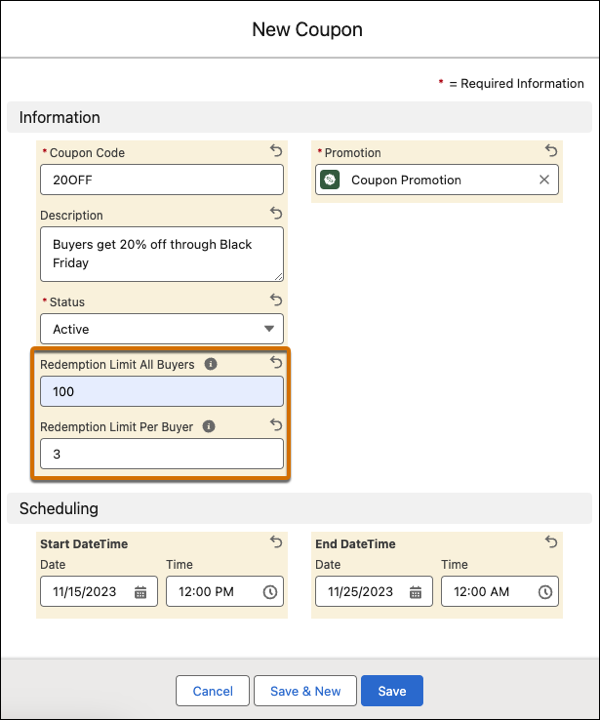
- Enter 20OFF for the Coupon Code and Black Friday as the associated promotion.
- Set the status to Active.
- Enter 100 as the redemption limit for all buyers and 3 as the redemption limit per buyer.
- Enter 11/15/2023 at 12:00 AM as the start date and time and 11/25/23 at 12:00 AM as the end date and time.