
B2B Commerce store components that include product images automatically scale the images for optimal performance and remain sharp across different devices.
Required Editions
| View supported editions. |
Which Salesforce Commerce Product Do I Have?
By default, these components use an 1:1 aspect ratio for product images and scale the images to fit the image container.
- Cart Items
- Order Line Item
- Order Products
- Order Summary
- Payments By Link
- Product Card
- Product Media Gallery
- Split Shipment Cart Contents
- Wishlist Product
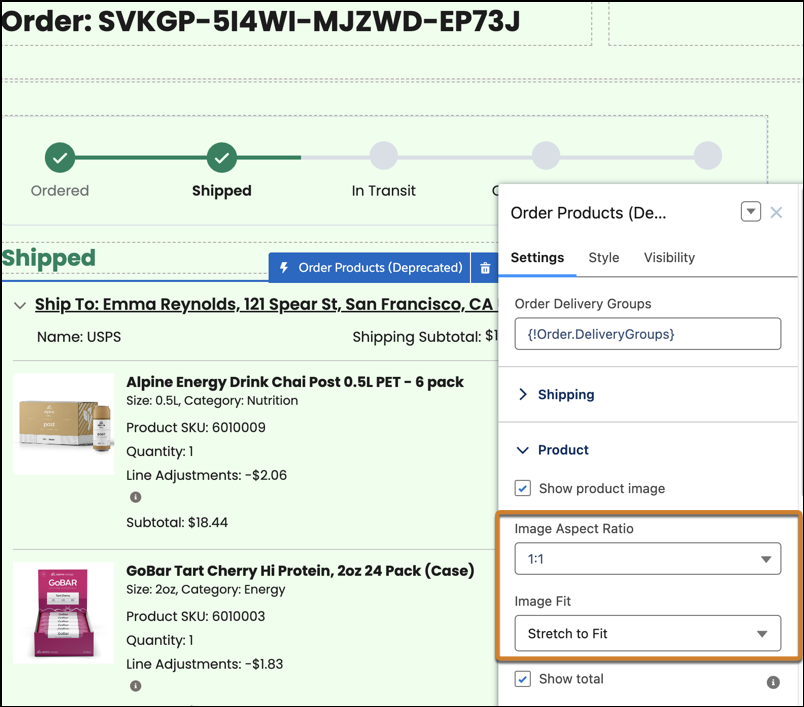
For product image components that have a different aspect ratio, change the aspect ratio value in the component to 2:3, 3:4, or 4:5. You can also select Stretch to Fit or Scale to Fit. To change a component's aspect ratio or image fit, in Experience Builder, click the component and modify the settings.
This image shows the Order Summary component that contains images with the aspect ratio of 1:1 and are stretched to fit.
To display high-quality product images, use modern image formats, like AVIF or WebP, instead of JPEG or PNG. If an image has varying aspect ratios, use a transparent background.
To enhance the performance of videos:
- Use modern formats such as WebM or MP4.
- Keep the resolution below 720p, and use a low frame rate.
- Display an assigned image while the video is downloading or until the video is played by adding a poster attribute to the video tag. If you don’t add a poster attribute, the video uses the first frame.