
A product class determines whether a product is sold individually or has variations. You can assign a product variation up to five attributes. Each variation has its own SKU so that you can track it.
Required Editions
| View supported editions. |
Which Salesforce Commerce Product Do I Have?
For example, you could define an attribute set called Apparel that includes five attributes: size, color, fit, fabric, and pattern. You can then use the Apparel attribute set to define variations for all products that are clothing.
To track product class values from the Product Workspace, add the Product Class and Product SKU fields to the Product page layout.
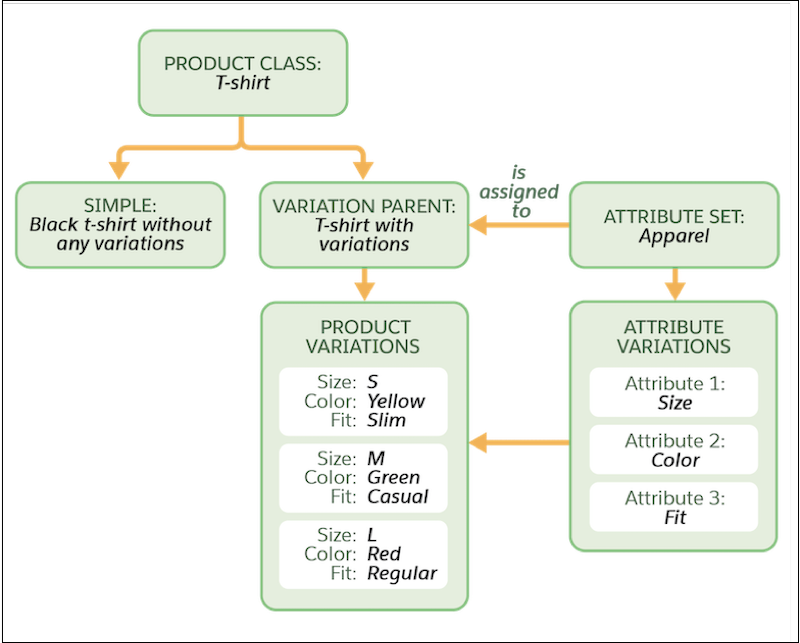
You can use these product classes.
- Simple—A product that is purchased individually and isn’t associated with variations. For example, a black backpack in a single size doesn’t have any variations. A simple product has one SKU that customers use to purchase the product.
- Variation Parent—A product that is a parent of variation products. A customer can’t purchase a variation parent. Only variations of a parent can be purchased.
- Variation Product—A product that is a child record of a variation parent. Each variation
product represents a unique set of attribute values and has its own SKU. For example,
consider a variation product that is a child of a Pants variation parent. The variation
product uses an Apparel attribute set, which includes these attributes: size (S, M, L),
color (Yellow, Green, Red), and fit (slim, casual, regular). So, an example of a variation
product can be pants that are assigned the values S, Y, and slim.
You can create variations only from a product with the Variation Parent product class. Cloning a variation product creates a simple product rather than another variation product.
- Product Set—A collection of related products that can be priced and purchased separately. For example, you can create a collection of floral dresses in a Spring Dresses product set and price each product separately.
This table shows the product elements that each class supports.
| Product Element | Simple Product Class | Variation Parent Class | Variation Product Class | Product Set Class |
|---|---|---|---|---|
| SKU |

|
|
||
| Standard & Custom Fields |
|
|
Cloned from parent variation product |
|
| Attribute Set |
|
|||
| Variation Attribute |
Unique by SKU |
|||
| Images |
|
|
|
|
| Attachments |
|
|
|
|
| Category |
|
|
Automatically assigned the same category as the variation parent product |
|
| Entitlement |
|
|
Assign the parent variation product to the entitlement first |
|
| Price |
|
|
|
|
| Orders |
|
|
||
| Localization |
|
|
|
|
| Tiered Pricing |
|
No |
|
Only for the child products |
| Searchable in Store |
|
But the parent variation product doesn’t appear in stores |
|
|
| Search Index |
|
|
|
|
| Add to Cart |
|
|
||
| Add to Wishlist |
|
|
||
| View in Order Summary |
|
|
||
| Inventory |
|
|