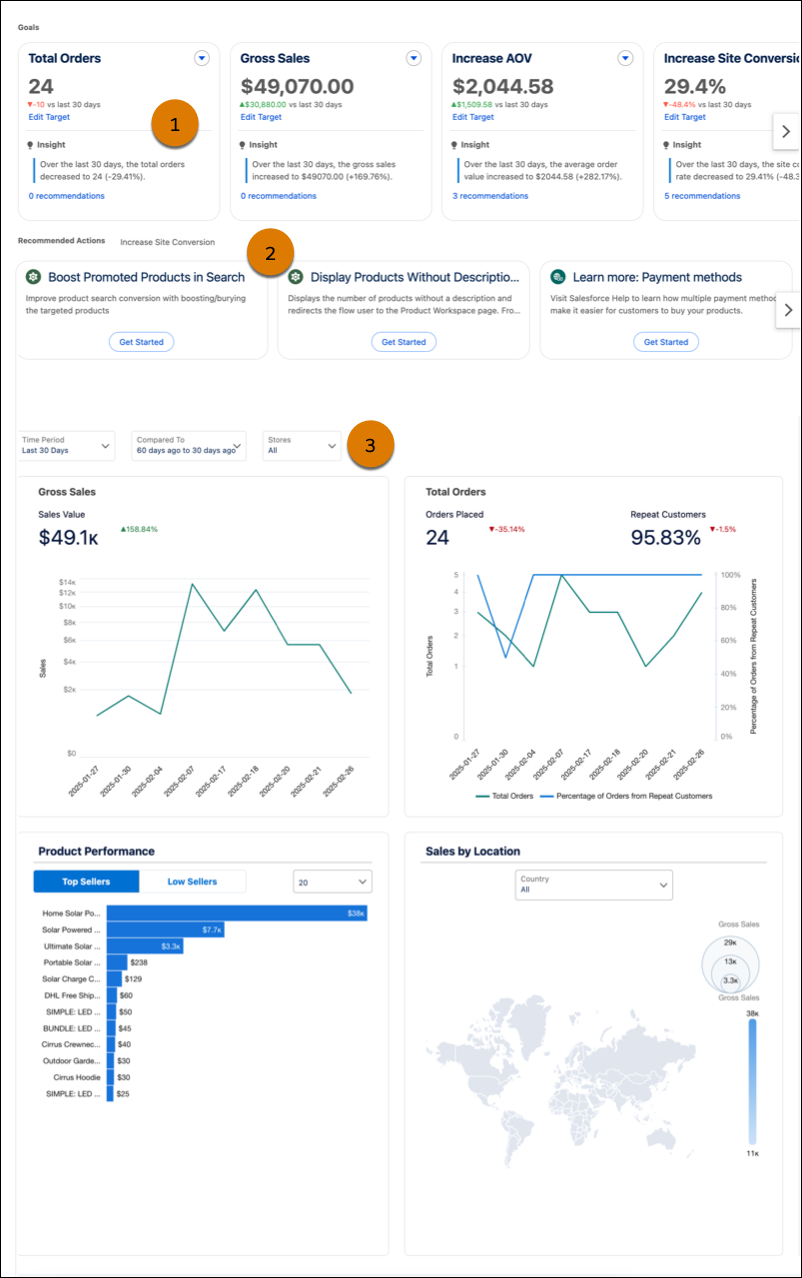
In the advanced Insights Overview dashboard, you can view trends and calculated
insights tied to specific goals and recommended actions. The dashboard also provides real-time
visualizations of key performance indicators by store. Use these insights and actions to make
informed decisions about how to improve your B2B Commerce store
performance.
Required Editions
Which
Salesforce Commerce Product Do I Have?
The advanced Insights Overview dashboard is available if you have Data 360 provisioned with CRM Analytics. See Set Up Data 360 for B2B
Commerce for more information. To view the site conversion rate data, enable
site conversion rate in the Data 360 for Commerce setup screen.
View trends and calculated insights associated with specific goals (1), like increasing AOV
or site conversion rate. Each goal is associated with recommended actions (2), which are tasks
you can complete to help reach your goal. Use filters (3) to update visualizations for gross
sales, total orders, product performance, and sales by location.