
If you’re using Salesforce Omnichannel Inventory, use this dashboard to get insight into inventory performance. View data about inventory levels and orders across locations and units sold.
Required Editions
| View supported editions. |
Which Salesforce Commerce Product Do I Have?
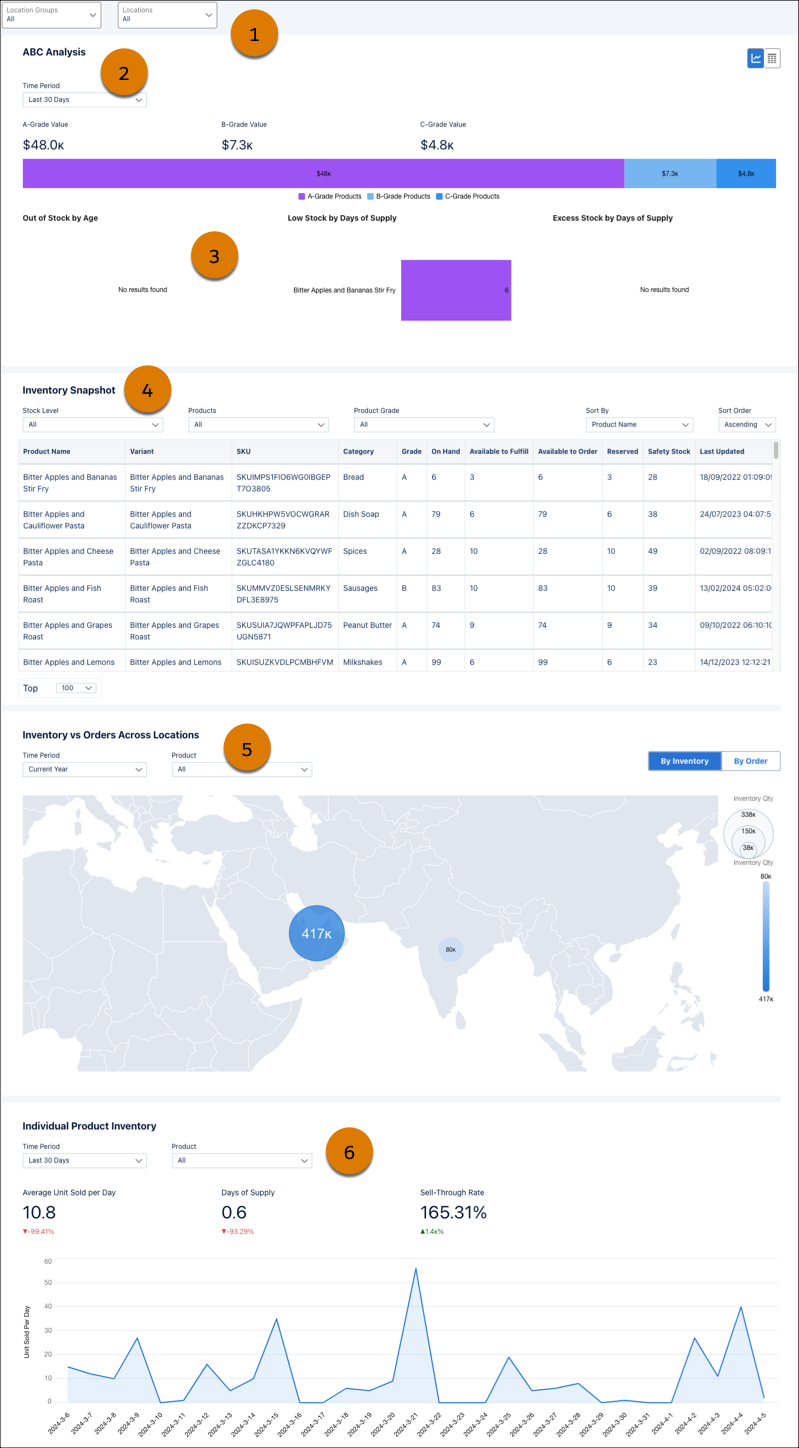
Use filters to select locations and time periods (1). See the value of inventory items based on their importance to the business (2), and review charts that show stock supply (3). Understand more about your current inventory snapshot with filters for stock level, product, and product grade (4). Review your inventory and order levels by location (5) and for individual products (6).
| INVENTORY KPI | CALCULATION |
|---|---|
| ABC Analysis by Product |
The value of inventory items based on their importance to the business. A-Grade are the top-selling products that account for 70%–80% of gross sales. B-Grade are products that account for 15%–25% of gross sales. C-Grade are products that account for 5%–10% of gross sales. |
| Out of Stock by Age | The number of days that the product was out of stock during the defined period. |
| Days of Supply | The number of days that the current inventory will last at the current rate of sales. |
| Low Stock by Days of Supply | Products with a Days of Supply less than 10 days. |
| Excess Stock by Days of Supply | Products with a Days of Supply greater than 180 days. |
| Average Unit Sold Per Day | The average number of inventory units sold each day over a specific period. |
| Sell-Through Rate | The percentage of inventory that was sold compared to what was available. |