
After you set up a Commerce Reorder Portal, configure an Einstein Next Best Action component on the Order record page. Based on a recommendation from this component, a rep can invite a buyer to the portal.
Required Editions
-
Add the Einstein Next Best Action component to the Order
record page.
- In the App Launcher, find and select Orders.
- Open an Order record.
-
Click the Setup icon
 at the top of the page, and then select Edit
Page.
at the top of the page, and then select Edit
Page.
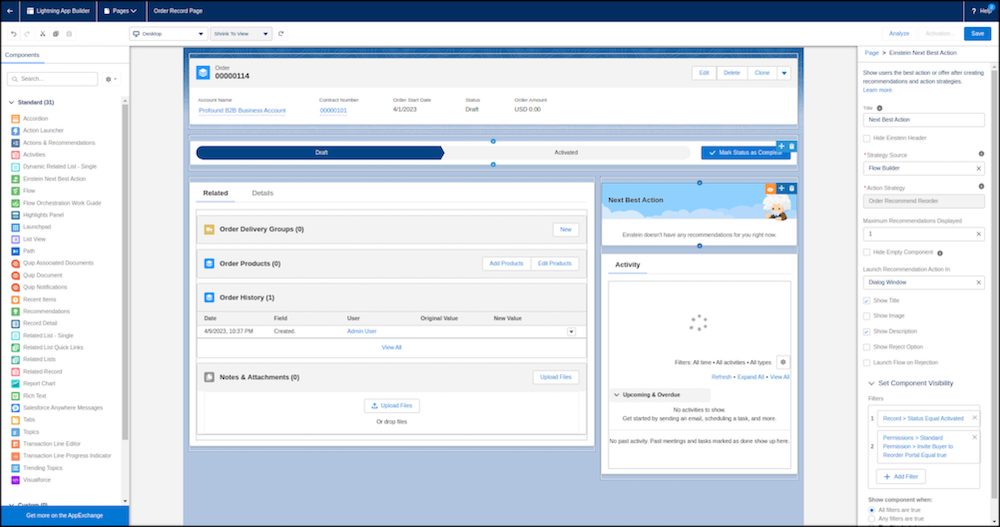
- From the Components menu, drag the Einstein Next Best Action component onto the Order Record Page layout in the Activity sidebar.
- Use the Order Recommend Reorder flow as Action Strategy input for the component.
-
Click Save.
- Enable any missing Field Level Security settings for Order.QuoteId, Order.ContractId, Order.CustomerAuthorizedBy, Quote.ContactId, and Contract.CustomerSignedId. See Field Level Security.
- Set External and Internal Organization-Wide Sharing Defaults to private for the Order Summary object.
-
Invite a buyer to a Commerce Reorder Portal using the Einstein Next Best Action
component.
- Open an Order record.
- From the Einstein Next Best Action component, click Invite to Reorder Portal.
- Follow the screen flow steps.