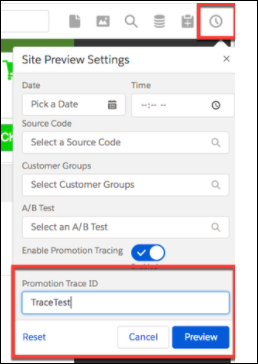
See which promotions are applied to a cart and which don’t apply and why. You can get the promotions tracing tool from the Storefront Toolkit. Promotions tracing is available only in non-production environments and only in the cart.
How: To enable promotions tracing, click the Preview Settings Tool icon in the Storefront
Toolkit.  . Select Enable Promotion Tracing and enter a Promotion Trace
ID. The Promotion Trace ID lets you track promotion log messages in the Request Log. Click
Preview. Log messages are saved to the Request Log. Messages indicate
the promotions that were applied to the cart and the promotions that were evaluated but not
applied.
. Select Enable Promotion Tracing and enter a Promotion Trace
ID. The Promotion Trace ID lets you track promotion log messages in the Request Log. Click
Preview. Log messages are saved to the Request Log. Messages indicate
the promotions that were applied to the cart and the promotions that were evaluated but not
applied.