---
schema_version: "1"
id: ab9453aae6a2d9d2eeffc43ed809224987e0e5c87da77a52db7c68f69c19399f
title: Configure Custom Error Pages for an eCDN Zone
collection: admin
version: current
locale: en-us
portal_url: https://docs.salesforce.com/admin/current/en-us/cc/264-0-0/b2c_configure_zone_custom_error_pages.md
canonical_url: https://help.salesforce.com/s/articleView?id=cc.b2c_configure_zone_custom_error_pages.htm&release=264.0.0&type=5
source_site: help.salesforce.com
content_type: documentation
content_hash: 32331b70896ca3f8413edd8b03a78f8861549e7c0f56cfa6069dfcb021e86997
description: Set custom HTML error pages for 500-class and 1000-class errors generated by the embedded CDN for a B2C Commerce zone, using the Configure Zone screen in Business Manager.
products:
- Commerce
- B2C Commerce
release: "264"
---
# Configure Custom Error Pages for an eCDN Zone
Set custom HTML error pages for 500-class and 1000-class errors generated by the embedded CDN for a B2C Commerce zone, using the Configure Zone screen in Business Manager.

Note Custom error pages aren't available on SCAPI zones. See [SCAPI Zone Support for B2C Commerce](https://help.salesforce.com/s/articleView?id=cc.b2c_scapi_zone.htm&release=264.0.0&type=5 "A SCAPI zone is the Salesforce-managed eCDN zone that fronts Salesforce Commerce API (SCAPI) traffic. Starting with B2C Commerce 26.10, the Production instance includes a subset of eCDN security controls and analytics for this zone in Business Manager and the CDN API, with no support case required.").
[Which Salesforce Commerce Product Do I Have?](https://help.salesforce.com/s/articleView?id=commerce.comm_what_product.htm&language=en_US)
When the embedded CDN generates a 500-class or 1000-class error, it can display a custom HTML page instead of a generic error. The custom page must be hosted at a publicly accessible URL on your B2C Commerce instance and must embed a specific error token so the CDN can render error details. 1000-class errors include Cloudflare 100x conditions such as DNS resolution failures and security challenge failures.
Use Custom Pages for these scenarios:
- **500 Class Errors** - shown when a web server is unable to process a request (HTTP 5xx).
- **1000 Class Errors** - shown when domain configuration, security settings, or origin setup prevents eCDN from completing the request.
- **I am under attack Page** - interstitial challenge shown to every visitor when Under Attack Mode is on.
1. In Business Manager, click the App Launcher, and then select **Administration** | **Sites** | **Embedded CDN Settings**.
2. Locate the zone you want to configure and select **Configure Zone** from the dropdown menu.
3. Select the **Customization** tab.
**Customization tab — Custom Pages**
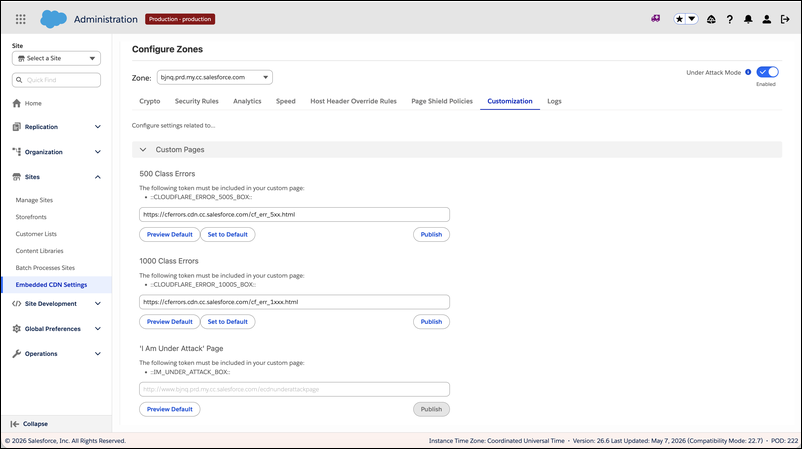
4. In each custom page section, confirm your HTML page contains the required tokens listed at the top of the form.
Without required tokens embedded in the HTML, the page can't be published.
5. In the **Custom Pages: 500 Class Errors** section, enter the URL of the HTML page you want displayed when the embedded CDN generates a 500-class error.
The HTML page must embed the 500 error class token. For example:
```
::CLOUDFLARE_ERROR_500S_BOX::
```

Note The token is case-sensitive and must match exactly.
6. In the **Custom Pages: 1000 Class Errors** section, enter the URL of the HTML page you want displayed when the embedded CDN generates a 1000-class error.
The HTML page must embed the 1000 error class token. For example:
```
::CLOUDFLARE_ERROR_1000S_BOX::
```

Note The token is case-sensitive and must match exactly.
7. In the **I am under attack Page** section, enter the URL for the challenge page shown while Under Attack Mode is enabled.
8. Click **Publish**.
The eCDN downloads the error page template from the URL you provided and stores it in the CDN infrastructure, making it available for all subdomains in the zone.

Note Repeat the Publish step whenever the error page template changes. Publishing is required each time to push the updated template to the CDN.
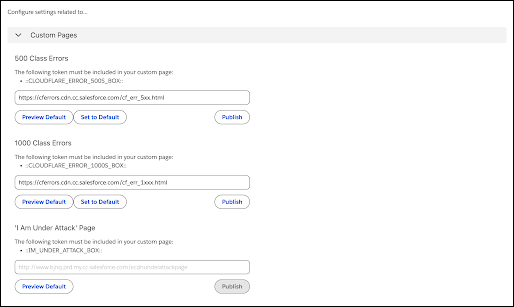
9. (Optional) Use additional page actions as needed.
- **Preview Default** shows what eCDN serves when no custom URL is configured.
- **Set to Default** reverts to the eCDN default page and appears only when a custom URL is currently published.
**Custom Pages actions for publish, preview, and defaults**
#### See Also
- [eCDN Zone Notifications](https://help.salesforce.com/s/articleView?id=cc.b2c_configure_zone_notifications.htm&release=264.0.0&type=5 "Get notified when eCDN events on your B2C Commerce storefront that matter to you happen, such as a Logpush job failure on a PCI-bound zone, a security incident, or a configuration change, without having to watch dashboards. The Notifications tab on the Configure Zone screen lets you configure webhook destinations and wire them up to one or more zones.")