---
schema_version: "1"
id: 28f69b374ff8e411606181d97eb52b99cb8254c3042f8a3ff49601286444854a
title: Edit or Delete a Workspace in Tableau Next
collection: admin
version: current
locale: en-us
portal_url: https://docs.salesforce.com/admin/current/en-us/analytics/264-0-0/tua_workspace_delete.md
canonical_url: https://help.salesforce.com/s/articleView?id=analytics.tua_workspace_delete.htm&release=264.0.0&type=5
source_site: help.salesforce.com
content_type: documentation
content_hash: 063a98cbf6cf19d52ba6f52c2dead954227e798df36bdf6c15902dd5f2bd51a4
description: Update a workspace name and description, or delete the workspace and its assets altogether. If the workspace reused an asset from somewhere else, deleting the workspace won't affect the original asset.
products:
- Tableau Next
release: "264"
---
# Edit or Delete a Workspace in Tableau Next
Update a workspace name and description, or delete the workspace and its assets altogether. If the workspace reused an asset from somewhere else, deleting the workspace won't affect the original asset.
### Required Editions
Tableau Unmetered Platform Analyst or Tableau Next Platform Analyst permission set
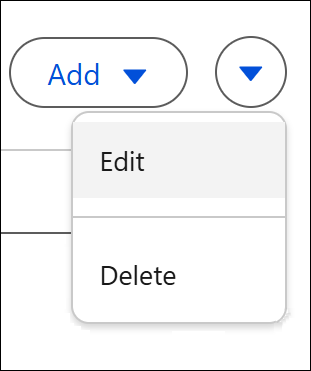
To change a workspace’s name and description, click **Edit** in the workspace dropdown.
To delete a workspace, click **Delete** in the workspace dropdown.
You can also delete individual assets in a workspace.

Note If you delete a workspace, the assets inside the workspace are also deleted. If a workspace asset is used in another workspace, the asset is deleted from both workspaces. If the workspace contains an asset that’s reused from another workspace, the original asset is unaffected.