---
schema_version: "1"
id: 85852a2d5590640556b4bd667a7923d719c5857d36eb23698dfa36bd728f9b2a
title: Add a Calculated Field to Your Data
collection: admin
version: current
locale: en-us
portal_url: https://docs.salesforce.com/admin/current/en-us/analytics/264-0-0/tua_viz_calculated_field.md
canonical_url: https://help.salesforce.com/s/articleView?id=analytics.tua_viz_calculated_field.htm&release=264.0.0&type=5
source_site: help.salesforce.com
content_type: documentation
content_hash: f8b1ca9c7dd5cf88919fd6388cf951952096bb98059ba4d4b26b8b328a0d8254
description: Sometimes, analyzing your data source requires adding a calculated field based on your existing fields. For example, you want to review the cost for each product that you sell. You can either create a calculated field manually, or you can use Semantics AI and let Einstein draft one for you.
products:
- Tableau Next
release: "264"
---
# Add a Calculated Field to Your Data
Sometimes, analyzing your data source requires adding a calculated field based on your existing fields. For example, you want to review the cost for each product that you sell. You can either create a calculated field manually, or you can use Semantics AI and let Einstein draft one for you.
### Required Editions
Tableau Unmetered Platform Analyst or Tableau Next Platform Analyst permission set
1. From the workspace, open the visualization.
2. From the semantic model’s context menu, select **Created Calculated Field**.
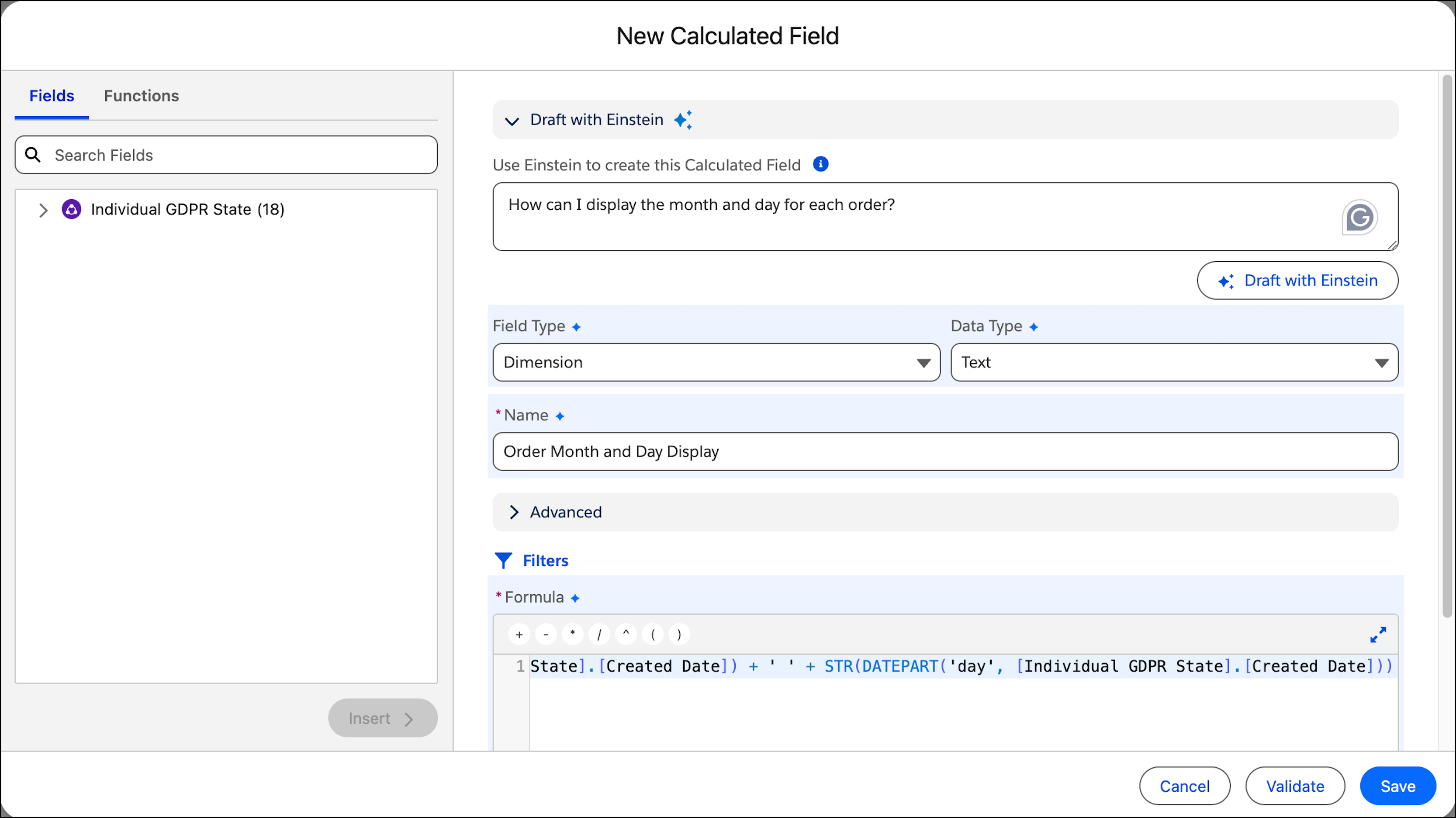
3. In the New Calculated Field dialog box, enter the formula that you want to apply. For more information, see [Build a Formula in a Calculated Field](https://help.salesforce.com/s/articleView?id=analytics.c360_a_sl_calc_fields_formula_build.htm&language=en_US). To use Semantics AI (Beta), under Draft with Einstein, explain the measure you want to create in the text box and then click **Draft with Einstein**.
Einstein suggests a formula and fills out all of the fields accordingly.

Note Semantics AI must be enabled in order to use it. For more information, see [Enable Semantics AI in Tableau Next (Beta)](https://help.salesforce.com/s/articleView?id=analytics.tua_admin_enable_semantics_ai.htm&release=264.0.0&type=5 "Use Semantics AI to generate calculated fields and to suggest relationships.").

Note Semantics AI is a pilot or beta service that is subject to the Beta Services Terms at [Agreements - Salesforce.com](https://www.salesforce.com/company/legal/agreements/) or a written Unified Pilot Agreement if executed by Customer, and applicable terms in the [Product Terms Directory](https://ptd.salesforce.com/). Use of this pilot or beta service is at the Customer's sole discretion.
4. Click **Validate**.
5. Save the formula.