---
schema_version: "1"
id: d362dc0c9ccefbb4f4bcd6f32dacfd17d975be0e04e2fdf8babf8e66d7d87102
title: Using Semantic Model AI Optimization (Beta)
collection: admin
version: current
locale: en-us
portal_url: https://docs.salesforce.com/admin/current/en-us/analytics/264-0-0/tua_data_sdm_model_opt_use.md
canonical_url: https://help.salesforce.com/s/articleView?id=analytics.tua_data_sdm_model_opt_use.htm&release=264.0.0&type=5
source_site: help.salesforce.com
content_type: documentation
content_hash: a3bd23b44985852b37cd620b5be583e602d2967e5df866d9b068c6e0d7c18fa7
description: After a system administrator enables the feature, you can begin using it to evaluate and improve your semantic models. You interact with the feature primarily through the Optimize Model Panel, which visualizes the Model Health and AI-readiness strength of your models.
products:
- Tableau Next
release: "264"
---
# Using Semantic Model AI Optimization (Beta)
After a system administrator enables the feature, you can begin using it to evaluate and improve your semantic models. You interact with the feature primarily through the Optimize Model Panel, which visualizes the Model Health and AI-readiness strength of your models.
### Required Editions

Note Semantic Model AI Optimization is a pilot or beta service that is subject to the Beta Services Terms at [Agreements - Salesforce.com](https://www.salesforce.com/company/legal/agreements/) or a written Unified Pilot Agreement if executed by Customer, and applicable terms in the [Product Terms Directory](https://ptd.salesforce.com/). Use of this pilot or beta service is at the Customer's sole discretion.
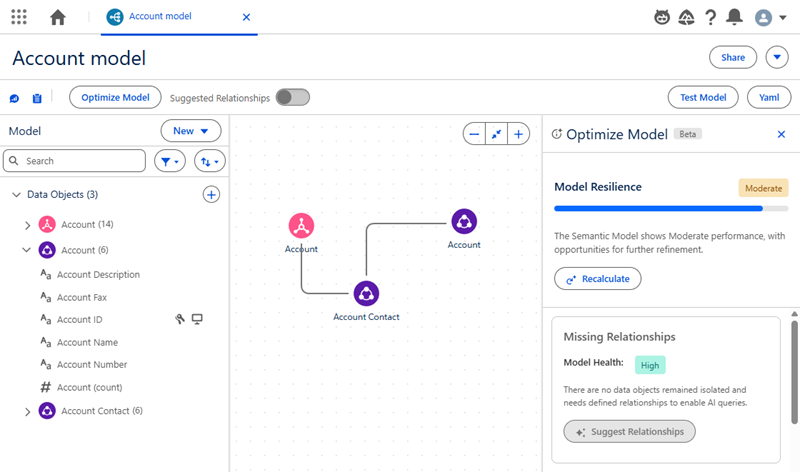
1. View the AI-readiness strength in the semantic model management table. The strength is displayed as a persistent signal.
2. Open an individual semantic model to see its strength rating.
3. Hover over the strength indicator to see a breakdown of the score. A tooltip summarizes the status and what it implies for agent compatibility.
4. Click for the full Readiness Panel to explore KPI levels, tooltips, and suggested actions.
Events such as publishing or saving a draft automatically recalculate the AI-readiness strength. To get update feedback, you can also trigger a manual recalculation from the semantic model, panel, or management page.
To learn more about semantic models and best practices for creating them, we recommend completing the [Design Your Semantic Model for Analysis Trailhead](https://trailhead.salesforce.com/content/learn/modules/semantic-models-in-tableau-next-quick-look/design-your-semantic-model-for-analysis).