---
schema_version: "1"
id: 5e46b48ebba778526fc9f0c1da5a71d2afdfa382ec758f30d6dee281a01cab33
title: Add a Metric to a Semantic Model
collection: admin
version: current
locale: en-us
portal_url: https://docs.salesforce.com/admin/current/en-us/analytics/264-0-0/tua_data_sdm_add_metrics.md
canonical_url: https://help.salesforce.com/s/articleView?id=analytics.tua_data_sdm_add_metrics.htm&release=264.0.0&type=5
source_site: help.salesforce.com
content_type: documentation
content_hash: 9398c68c3bc091f9775b705088960d14d8a213c9a9520b428a581e46f6adf281
description: Within Tableau Next, create a metric based on a semantic model.
products:
  - Tableau Next
release: "264"
---
# Add a Metric to a Semantic Model

Within Tableau Next, create a metric based on a semantic model.

### Required Editions

<table class="slds-table slds-table_bordered slds-max-medium-table_stacked slds-m-bottom_small edition"><colgroup><col></colgroup><tbody><tr class=""><td class="slds-cell-wrap" style="vertical-align:top;"><a href="https://help.salesforce.com/s/articleView?id=analytics.tua_editions.htm&amp;language=en_US" target="_blank">View supported editions.</a></td></tr></tbody></table>

<table class="slds-table slds-table_bordered slds-max-medium-table_stacked slds-m-bottom_small permission">
        <colgroup>
          <col style="width:50%">
          <col style="width:50%">
        </colgroup>
        <thead class="slds-text-title_caps ">
          <tr class="">
            <th scope="colgroup" class="slds-cell-wrap" colspan="2" style="text-align:center;vertical-align:top;" id="d47827e56">User Permissions Needed</th>
          </tr>
        </thead>
        <tbody>
          <tr class="">
            <td data-label="User Permissions Needed" class="slds-cell-wrap" style="vertical-align:top;" headers="d47827e56 ">To add a metric to a semantic model: </td>

            <td class="slds-cell-wrap" style="vertical-align:top;" headers="d47827e56 "><span>Tableau Unmetered Platform Analyst or Tableau Next Platform Analyst</span> permission set</td>

          </tr>
        </tbody>
      </table>

1. From your workspace, open the model that you want to use for defining a metric.
2. A new model opens in builder mode. In an existing model, to open builder mode, click **Edit**.

    
    ![The semantic model view with the Edit button highlighted.](https://sf-zdocs-cdn-prod.zoominsoftware.com/tdta-analytics-tua-264-0-0-production-enus/d794334f-d174-49d3-a4d2-a615bd2e54aa/tua/images/tua_data_sdm_new_model.png)
3. To create a metric, from the **New** dropdown, select **Metrics**.
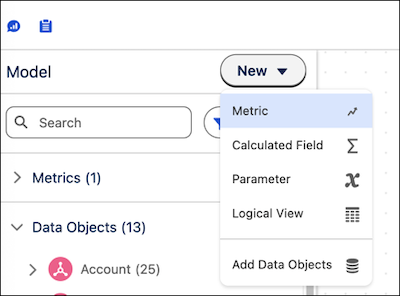
    
    ![The New action menu in the semantic model builder view.](https://sf-zdocs-cdn-prod.zoominsoftware.com/tdta-analytics-tua-264-0-0-production-enus/d794334f-d174-49d3-a4d2-a615bd2e54aa/tua/images/tua_data_sdm_new_action_menu.png)
4. Define the metric. For more information, see [Create a Metric for a Semantic Model](https://help.salesforce.com/s/articleView?id=analytics.c360_a_sl_metrics_create.htm&language=en_US).

The metric is now available to use in dashboards, to follow, and to embed in web pages.