---
schema_version: "1"
id: 75aac5c45df4f27b0aaf2823f274573862c4ac0c78f15b13971cc99cefb4b2b2
title: Evaluate Cyclical Patterns with Spoke Bar Charts
collection: admin
version: current
locale: en-us
portal_url: https://docs.salesforce.com/admin/current/en-us/analytics/264-0-0/tua_create_radial_spoke_how_to.md
canonical_url: https://help.salesforce.com/s/articleView?id=analytics.tua_create_radial_spoke_how_to.htm&release=264.0.0&type=5
source_site: help.salesforce.com
content_type: documentation
content_hash: eaddb6a037919476c95dd5294411b45f48f367f8759bfbd65fa024c1b23af238
description: Quickly identify recurring patterns and changes across cyclical or periodic data with a Tableau Next spoke bar chart. Bars extend outward from a central hub, with each spoke typically representing a regular interval in a recurring cycle. For example, visualize monthly order counts to identify seasonal peaks and slower periods during a fiscal year.
products:
- Tableau Next
release: "264"
---
# Evaluate Cyclical Patterns with Spoke Bar Charts
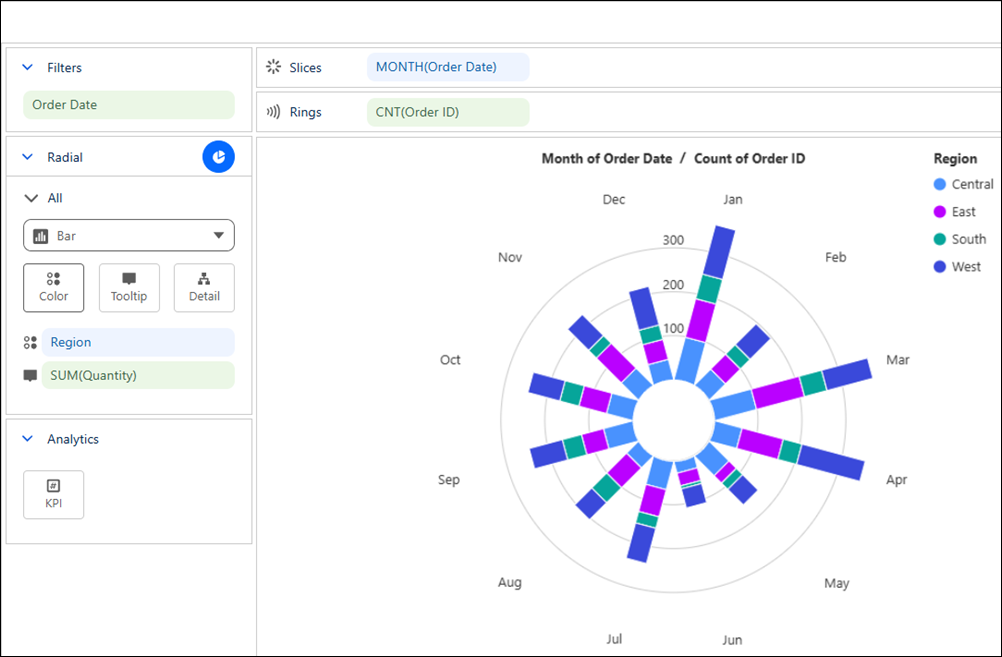
Quickly identify recurring patterns and changes across cyclical or periodic data with a Tableau Next spoke bar chart. Bars extend outward from a central hub, with each spoke typically representing a regular interval in a recurring cycle. For example, visualize monthly order counts to identify seasonal peaks and slower periods during a fiscal year.
### Required Editions
Tableau Unmetered Platform Analyst or Tableau Next Platform Analyst permission set
1. From the Show Me pane in your visualization, click the  thumbnail. The layout changes to Spoke bar chart, and the pane shows the required fields and supported field encodings for the chart type.
2. From the Data pane in your visualization, drag the continuous measure field you want to visualize onto **Rings**. For the chart in the example, select **Order ID**.
3. From the Order ID field’s context menu, select **Measure** | **Count**.
4. Drag a time field, such as **Order Date**, onto **Slices**, and set the date part to the desired time interval, such as **Month**.
5. To filter the visualization to a single fiscal year, drag **Order Date** to **Filters**. Set the date range to start on the first day and end on the last day of the fiscal year.
6. Optionally, to compare patterns across groups, drag **Region** onto **Color**.
7. Optionally, drag a measure onto KPI to highlight its value in the center of the chart.
8. You can further customize the visualization with labels or tooltips to make the chart easier to interpret.
9. Save your visualization.