---
schema_version: "1"
id: 40113cec2b9f06713b87d5bdf5a66ea252ce5652f251477f0137244ef7b2dec3
title: Configure the C360 Semantic Model
collection: admin
version: current
locale: en-us
portal_url: https://docs.salesforce.com/admin/current/en-us/analytics/264-0-0/tua_create_c360_sdm.md
canonical_url: https://help.salesforce.com/s/articleView?id=analytics.tua_create_c360_sdm.htm&release=264.0.0&type=5
source_site: help.salesforce.com
content_type: documentation
content_hash: f9acd6b6b84600f649a12f00a3d4339be549450ebc4b9760220e7920427b69ad
description: The Tableau Next C360 semantic model template offers a unified perspective of your data by consolidating metrics from various Customer 360 features, such as Sales, Service, Marketing, and Commerce. The template installs the semantic model and more than 40 pre-configured metrics, including open pipeline, open and closed cases, email delivery and open rates. These detailed insights are designed to support program managers and stakeholders. By providing a clear breakdown of performance across multiple dimensions, the template allows effective progress monitoring, the identification of areas needing improvement, and the execution of data-driven decision-making.
products:
- Tableau Next
release: "264"
---
# Configure the C360 Semantic Model
The Tableau Next C360 semantic model template offers a unified perspective of your data by consolidating metrics from various Customer 360 features, such as Sales, Service, Marketing, and Commerce. The template installs the semantic model and more than 40 pre-configured metrics, including open pipeline, open and closed cases, email delivery and open rates. These detailed insights are designed to support program managers and stakeholders. By providing a clear breakdown of performance across multiple dimensions, the template allows effective progress monitoring, the identification of areas needing improvement, and the execution of data-driven decision-making.
### Required Editions
Tableau Unmetered Platform Analyst or Tableau Next Platform Analyst permission set
To install semantic models in Data 360:
Data Cloud Architect permission set
This template is designed to work with the Customer 360 data model that incorporates data from multiple parts of your business, like sales, service, marketing, and commerce.
1. On the Tableau Next home page, select **Marketplace**.
1. In the Search box, enter C360, and select the C360 Semantic Model tile.
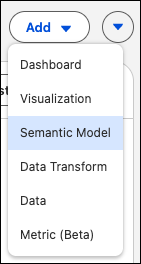
2. Or, from your Tableau Next workspace, click **Add**, and select **Semantic Model**.
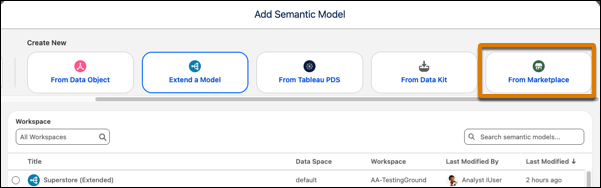
3. Under Create New, select **From Marketplace**.
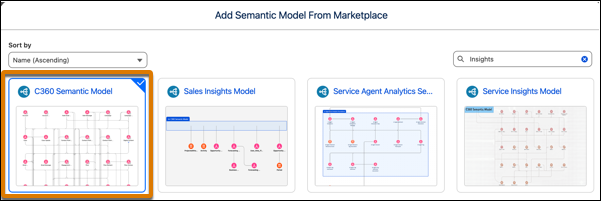
4. Select the C360 Semantic Model tile.
2. View the template details and click **Next** to start the installation process.
The template generates the semantic model and metrics, displaying the installation progress. After installation is complete, use the semantic model and metrics to view your Customer 360 data and create your own custom metrics, visualizations, and dashboards.
#### See Also
- [_Salesforce Help:_ Customer 360 Data Model](https://help.salesforce.com/s/articleView?id=data.c360_a_c360datamodel.htm&language=en_US)