---
schema_version: "1"
id: 128d8cc0a72ee62d5951509cc9c965d7cf6749683b82d9a8976d7dd1ce130103
title: Edit or Delete an App Template
collection: admin
version: current
locale: en-us
portal_url: https://docs.salesforce.com/admin/current/en-us/analytics/264-0-0/tua_build_app_template_update.md
canonical_url: https://help.salesforce.com/s/articleView?id=analytics.tua_build_app_template_update.htm&release=264.0.0&type=5
source_site: help.salesforce.com
content_type: documentation
content_hash: 267a22a86f9a34eebdecfbfbed46073cc4083ee5426a97f0e44000b2afa448a3
description: Edit a Tableau Next template's details or resources, remove template resources, or delete a template.
products:
  - Tableau Next
release: "264"
---
# Edit or Delete an App Template

Edit a Tableau Next template's details or resources, remove template resources, or delete a template.

### Required Editions

<table class="slds-table slds-table_bordered slds-max-medium-table_stacked slds-m-bottom_small edition"><colgroup><col></colgroup><tbody><tr class=""><td class="slds-cell-wrap" style="vertical-align:top;"><a href="https://help.salesforce.com/s/articleView?id=analytics.tua_editions.htm&amp;language=en_US" target="_blank">View supported editions.</a></td></tr></tbody></table>

<table class="slds-table slds-table_bordered slds-max-medium-table_stacked slds-m-bottom_small permission">
        <colgroup>
          <col>
          <col>
        </colgroup>
        <thead class="slds-text-title_caps ">
          <tr class="">
            <th scope="colgroup" class="slds-cell-wrap" colspan="2" style="text-align:center;vertical-align:top;" id="d57679e54">User Permissions Needed</th>
          </tr>
        </thead>
        <tbody>
          <tr class="">
            <td data-label="User Permissions Needed" class="slds-cell-wrap" style="vertical-align:top;" headers="d57679e54 ">To view, create, and edit Tableau Next templates:</td>

            <td class="slds-cell-wrap" style="vertical-align:top;" headers="d57679e54 "><span>Tableau Unmetered Platform Analyst or Tableau Next Platform Analyst</span> permission set</td>

          </tr>
        </tbody>
      </table>

When you update app templates, consider the following.

- If any source assets are deleted, update the template to reflect the removal. Save the template to apply the changes.
- After an app is installed from a template, updates to the template don't affect installed apps. Only new app installations include the updates.
- If you delete a template with installed apps, a list of the installed apps appears. Cancel the operation, or proceed to delete the template and all its installed apps.

1. On the Templates page, select the template you want to update.
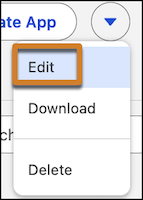
2. To edit the template properties, click **Edit**.
    
    ![The Edit action for a template](https://sf-zdocs-cdn-prod.zoominsoftware.com/tdta-analytics-tua-264-0-0-production-enus/d794334f-d174-49d3-a4d2-a615bd2e54aa/tua/images/tua_templates_edit_action.png)
    
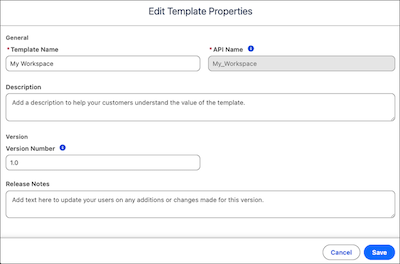
    1. Edit your template properties and save.
        
        ![The edit dialog for template properties.](https://sf-zdocs-cdn-prod.zoominsoftware.com/tdta-analytics-tua-264-0-0-production-enus/d794334f-d174-49d3-a4d2-a615bd2e54aa/tua/images/tua_templates_edit_template_properties.png)
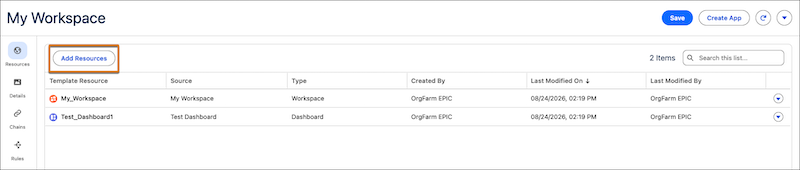
3. Add more resources to your template with **Add Resources**.
    
    ![The Add Resources action for a template](https://sf-zdocs-cdn-prod.zoominsoftware.com/tdta-analytics-tua-264-0-0-production-enus/d794334f-d174-49d3-a4d2-a615bd2e54aa/tua/images/tua_templates_add_resources.png)
    
    Resources can be from other workspaces.
4. To remove a resource from your template, select **Remove**.

    
    ![The Remove action for a template resource](https://sf-zdocs-cdn-prod.zoominsoftware.com/tdta-analytics-tua-264-0-0-production-enus/d794334f-d174-49d3-a4d2-a615bd2e54aa/tua/images/tua_templates_remove_resource.png)
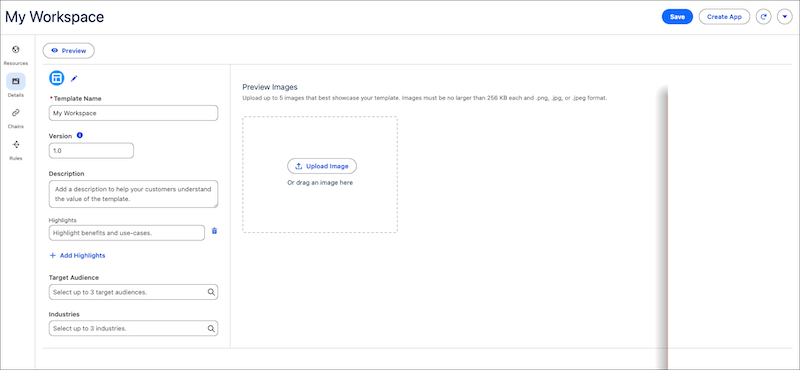
5. To edit the template details, including preview images, highlights, and tags, open the **Details** page.
    
    ![The Details page for a Tableau Next template](https://sf-zdocs-cdn-prod.zoominsoftware.com/tdta-analytics-tua-264-0-0-production-enus/d794334f-d174-49d3-a4d2-a615bd2e54aa/tua/images/tua_templates_template_details.png)
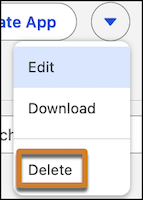
6. To delete the template, click **Delete**.
    
    ![The Delete action for a template](https://sf-zdocs-cdn-prod.zoominsoftware.com/tdta-analytics-tua-264-0-0-production-enus/d794334f-d174-49d3-a4d2-a615bd2e54aa/tua/images/tua_templates_delete_action.png)

To edit template processing, such as rules and customization, download the template files.