---
schema_version: "1"
id: 2be1c922aad2faee10591b1e7e9c810b150942f4d615f554f6f1d7b03ab8e2be
title: Monitor Usage Statistics for Einstein Discovery for Reports
collection: admin
version: current
locale: en-us
portal_url: https://docs.salesforce.com/admin/current/en-us/analytics/264-0-0/ri_admin_usage.md
canonical_url: https://help.salesforce.com/s/articleView?id=analytics.ri_admin_usage.htm&release=264.0.0&type=5
source_site: help.salesforce.com
content_type: documentation
content_hash: 3acf0b64655a9d7f8579ae833976bb8d31ab8b25b661fec7b67fedab1e7268a7
description: Einstein Discovery for Reports monitors usage statistics in real time. You can view the usage statistics in your org.
products:
- Cross Cloud
release: "264"
---
# Monitor Usage Statistics for Einstein Discovery for Reports
Einstein Discovery for Reports monitors usage statistics in real time. You can view the usage statistics in your org.
### Required Editions
Available in Lightning Experience
Available in Enterprise, Performance, and Unlimited Editions. Also available in Developer Edition.
User
Permissions Needed
To monitor Einstein Discovery for Reports usage statistics:
Customize Application

Note Before you begin, Analytics must be enabled in your org. To enable Analytics, see [Basic Analytics Platform Setup](https://help.salesforce.com/s/articleView?id=analytics.bi_help_setup_basic.htm&language=en_US).
To view usage statistics:
1. From Setup, in the Quick Find box, enter Discovery.
2. Under **Einstein Discovery and Einstein Discovery for Reports**, select **Usage**.
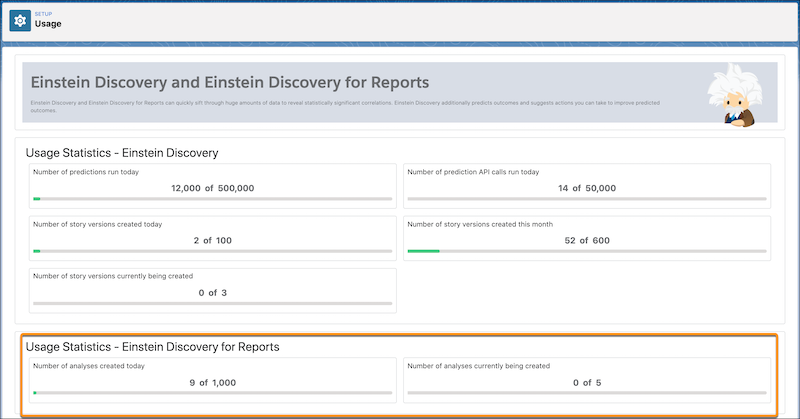

Note Times and dates are based on your org’s default time zone.
| Statistic | Description |
| --- | --- |
| Number of analysis created today | Total number of analyses created in your org since 12:00am today. |
| Number of analysis currently being created | Total number of analyses that are currently being run in your org. |
#### See Also
- [Einstein Discovery for Reports: Limits and Allocations](https://help.salesforce.com/s/articleView?id=analytics.ri_limits_considerations_allocations.htm&release=264.0.0&type=5 "Learn about the limits, allocations, and considerations for Einstein Discovery for Reports.")