---
schema_version: "1"
id: ac31490db09d5e5b3fed7a4015f124a6df10485777a41af8fb41107be72bdfda
title: Create a Dimension Hierarchy
collection: admin
version: current
locale: en-us
portal_url: https://docs.salesforce.com/admin/current/en-us/analytics/264-0-0/c360_a_sl_dimension_hierarchies_create.md
canonical_url: https://help.salesforce.com/s/articleView?id=analytics.c360_a_sl_dimension_hierarchies_create.htm&release=264.0.0&type=5
source_site: help.salesforce.com
content_type: documentation
content_hash: d57c3c7a439b6f24f23bbebb2de76b578281e6fdddd6701002fa42bb50f467aa
description: Group related dimensions using fields from single or multiple objects to create a single, navigable path for data exploration.
products:
  - Data 360
release: "264"
---
# Create a Dimension Hierarchy

Group related dimensions using fields from single or multiple objects to create a single, navigable path for data exploration.

### Required Editions

<table class="slds-table slds-table_bordered slds-max-medium-table_stacked slds-m-bottom_small edition"><colgroup><col></colgroup><tbody><tr class=""><td class="slds-cell-wrap" style="vertical-align:top;">Available in: All editions supported by <span>Data 360</span>. See <a href="https://help.salesforce.com/s/articleView?id=data.c360_a_dc_editions.htm&amp;language=en_US" target="_blank"><span>Data 360</span> edition availability</a>.</td></tr></tbody></table>

<table class="slds-table slds-table_bordered slds-max-medium-table_stacked slds-m-bottom_small permission">
        <colgroup>
          <col style="width:50%">
          <col style="width:50%">
        </colgroup>
        <thead class="slds-text-title_caps ">
          <tr class="">
            <th scope="colgroup" class="slds-cell-wrap" colspan="2" style="text-align:left;vertical-align:top;" id="d16871e63">User Permissions Needed</th>
          </tr>
        </thead>
        <tbody>
          <tr class="">
            <td data-label="User Permissions Needed" class="slds-cell-wrap" style="vertical-align:top;" headers="d16871e63 ">To create a dimensions hierarchy:</td>

            <td class="slds-cell-wrap" style="vertical-align:top;" headers="d16871e63 ">
              <p>Permission set: </p>
              <ul>
                <li>Data Cloud Architect</li>

              </ul>
              <p>AND</p>
              <p style="margin-bottom:0;">Semantic Models object</p>
            </td>

          </tr>
        </tbody>
      </table>

1. In Data Cloud, on the Semantic Layer tab, select a data model.
2. From the New dropdown, select **Dimension Hierarchy**.
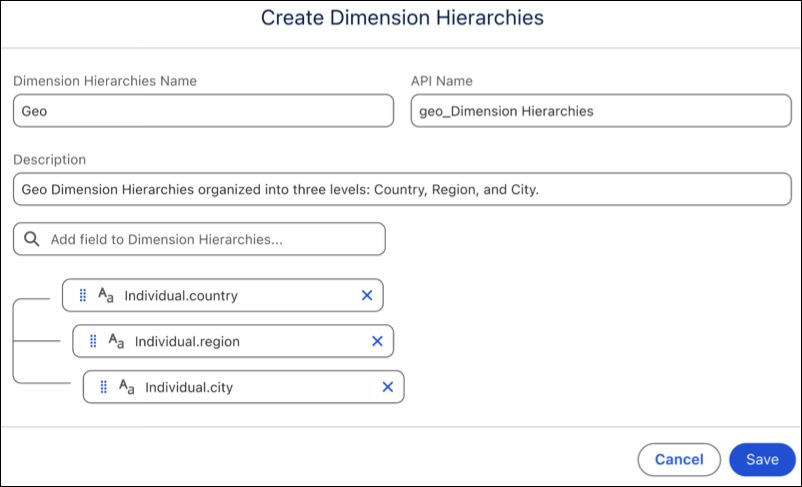
3. Name the hierarchy, and enter an optional description.
4. Add the fields.
5. Define the drill-down path by placing the dimension from the broadest category at the top to the most specific detail at the bottom.
    
    If you’re combining fields from multiple objects, they must have an established relationship in the data model. If the objects aren’t related, the data doesn’t load correctly.
    
    ![SL Dimension Hierarchy](https://sf-zdocs-cdn-prod.zoominsoftware.com/tdta-analytics-semantics-264-0-0-production-enus/f7c99ab1-3439-4722-b925-34cb47455d89/semantics/images/semanticlayer/SL_Dimension_Hierarchy_new.png)
6. Click **Save**.