---
schema_version: "1"
id: fc41c8520118978b990e30ae9af8ea6429f04a1af8096a499513e652555741b1
title: Refresh a Semantic Model Created from a Published Data Source (PDS)
collection: admin
version: current
locale: en-us
portal_url: https://docs.salesforce.com/admin/current/en-us/analytics/264-0-0/c360_a_sl_data_models_pds_refresh_sm.md
canonical_url: https://help.salesforce.com/s/articleView?id=analytics.c360_a_sl_data_models_pds_refresh_sm.htm&release=264.0.0&type=5
source_site: help.salesforce.com
content_type: documentation
content_hash: ee43a232bf76418c3c967fc40cfd3aeafd2485ff11cf1870d864f6b863cca3bb
description: Refresh a semantic model created from a Published Data Source (PDS) to synchronize it with updates made to the underlying PDS.
products:
  - Data 360
release: "264"
---
# Refresh a Semantic Model Created from a Published Data Source (PDS)

Refresh a semantic model created from a Published Data Source (PDS) to synchronize it with updates made to the underlying PDS.

### Required Editions

<table class="slds-table slds-table_bordered slds-max-medium-table_stacked slds-m-bottom_small edition"><colgroup><col></colgroup><tbody><tr class=""><td class="slds-cell-wrap" style="vertical-align:top;">Available in: All editions supported by <span>Data 360</span>. See <a href="https://help.salesforce.com/s/articleView?id=data.c360_a_dc_editions.htm&amp;language=en_US" target="_blank"><span>Data 360</span> edition availability</a>.</td></tr></tbody></table>

<table class="slds-table slds-table_bordered slds-max-medium-table_stacked slds-m-bottom_small permission">
        <colgroup>
          <col style="width:50%">
          <col style="width:50%">
        </colgroup>
        <thead class="slds-text-title_caps ">
          <tr class="">
            <th scope="colgroup" class="slds-cell-wrap" colspan="2" style="text-align:left;vertical-align:top;" id="d11144e63">User Permissions Needed</th>
          </tr>
        </thead>
        <tbody>
          <tr class="">
            <td data-label="User Permissions Needed" class="slds-cell-wrap" style="vertical-align:top;" headers="d11144e63 ">To refresh a semantic model:</td>

            <td class="slds-cell-wrap" style="vertical-align:top;" headers="d11144e63 ">
              <p>Data Cloud Architect permission set</p>
              <p>AND</p>
              <p>Semantic Models permission
                set</p>
              <p>AND</p>
              <p style="margin-bottom:0;">Tableau Next license</p>
            </td>

          </tr>
        </tbody>
      </table>

1. In the Semantic Model Builder, open the model you want to update.
2. Click the **Refresh Schema** button in the upper-right corner of the data source box.
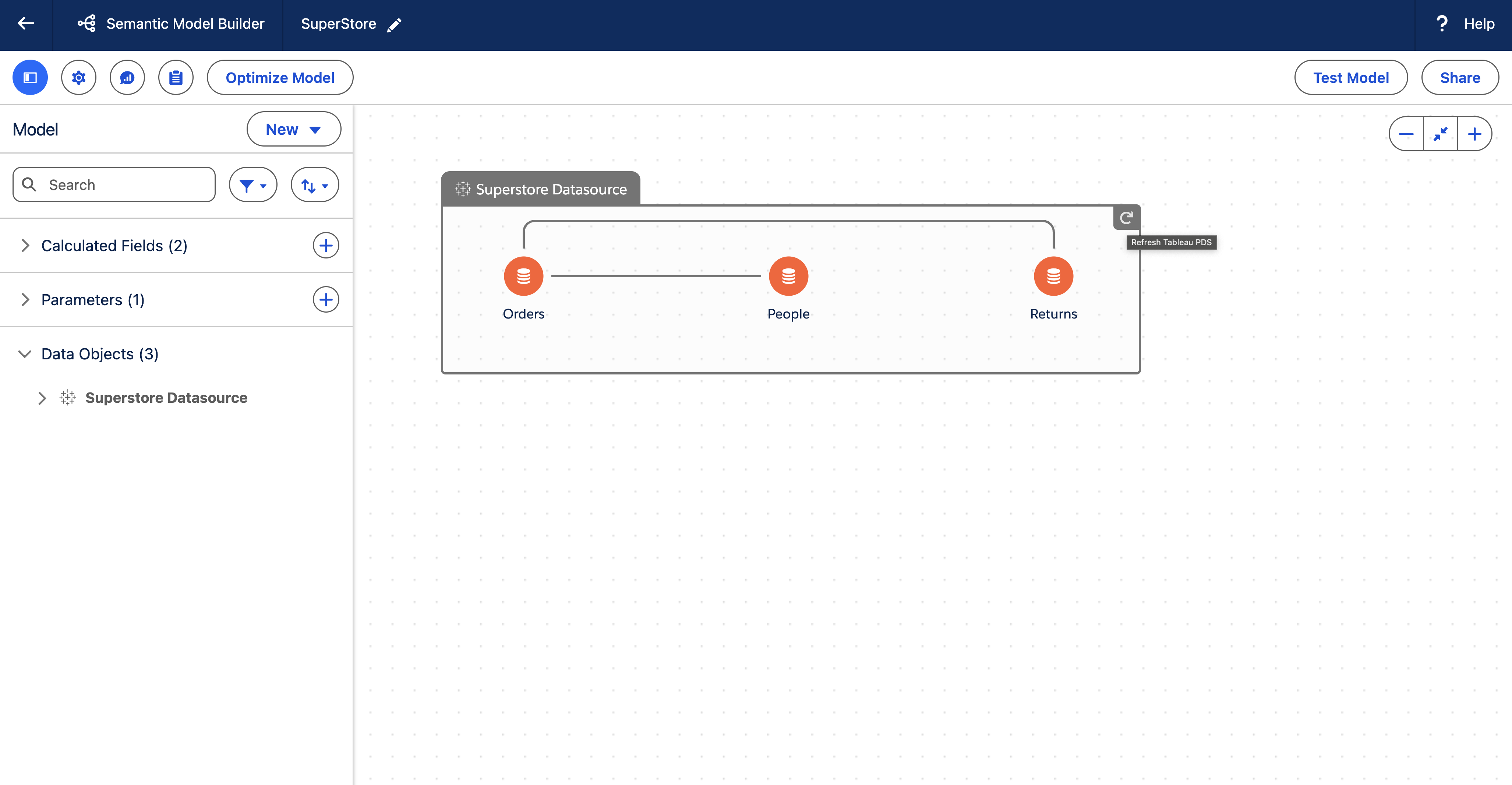
![Refresh button for a PDS-based SM](https://sf-zdocs-cdn-prod.zoominsoftware.com/tdta-analytics-semantics-264-0-0-production-enus/f7c99ab1-3439-4722-b925-34cb47455d89/semantics/images/semanticlayer/sl_pds_refresh.png)

When you refresh, any structural changes in the PDS (such as new or removed objects, fields, or relationships) are reflected in the semantic model.