---
schema_version: "1"
id: b3c8deb982d43a7f8fcc0b7dacac1bcb04ec57c9041e9fc36244a3ad1ee473fc
title: Test Row-Level Security for the Dataset
collection: admin
version: current
locale: en-us
portal_url: https://docs.salesforce.com/admin/current/en-us/analytics/264-0-0/bi_security_rowlevel_example_rolehierarchy_testpredicate.md
canonical_url: https://help.salesforce.com/s/articleView?id=analytics.bi_security_rowlevel_example_rolehierarchy_testpredicate.htm&release=264.0.0&type=5
source_site: help.salesforce.com
content_type: documentation
content_hash: c05b76f56543e7358c2c1bc68d3c7b1a89bb9879d926f18689841af845d1e27d
description: You must verify that the predicate is applied properly and that each user can see the appropriate opportunities.
products:
  - CRM Analytics
  - Cross Cloud
release: "264"
---
# Test Row-Level Security for the Dataset

You must verify that the predicate is applied properly and that each user can see the appropriate opportunities.

### Required Editions

<table class="slds-table slds-table_bordered slds-max-medium-table_stacked slds-m-bottom_small edition"><colgroup><col></colgroup><tbody><tr class=""><td class="slds-cell-wrap" style="vertical-align:top;">Available in Salesforce Classic and Lightning Experience.</td></tr><tr class=""><td class="slds-cell-wrap" style="vertical-align:top;">Available with CRM Analytics, which is available for an extra cost in <strong>Enterprise</strong>, <strong>Performance</strong>, and <strong>Unlimited</strong> Editions. Also available in <strong>Developer</strong> Edition.</td></tr></tbody></table>

<table class="slds-table slds-table_bordered slds-max-medium-table_stacked slds-m-bottom_small permission">
        <colgroup>
          <col style="width:50%">
          <col style="width:50%">
        </colgroup>
        <thead class="slds-text-title_caps ">
          <tr class="">
            <th scope="colgroup" class="slds-cell-wrap" colspan="2" style="text-align:center;vertical-align:top;" id="d139241e47">User Permissions
              Needed</th>
          </tr>
        </thead>
        <tbody>
          <tr class="">
            <td data-label="User Permissions Needed" class="slds-cell-wrap" style="vertical-align:top;" headers="d139241e47 ">&nbsp;</td>
            <td class="slds-cell-wrap" style="vertical-align:top;" headers="d139241e47 ">&nbsp;</td>
          </tr>
          <tr class="">
            <td data-label="User Permissions Needed" class="slds-cell-wrap" style="vertical-align:top;" headers="d139241e47 ">&nbsp;</td>
            <td class="slds-cell-wrap" style="vertical-align:top;" headers="d139241e47 ">&nbsp;</td>
          </tr>
        </tbody>
      </table>

1. Log in to CRM Analytics as Bill.
2. Open the OppRoles opportunity.
    
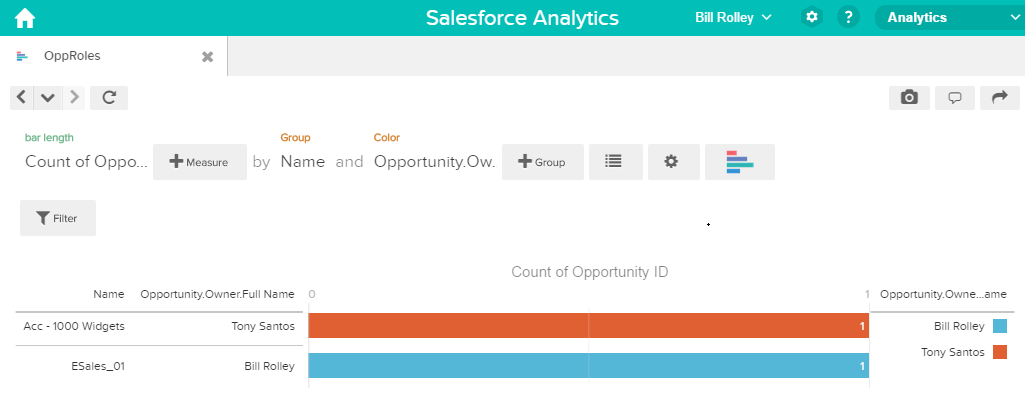
    Notice that Bill can’t see his manager Keith’s opportunities anymore. Now, he can see only his opportunity and his subordinate Tony’s opportunity.
    
    ![Bill can see his opportunity and the opportunity owned by his subordinate Tony.](https://sf-zdocs-cdn-prod.zoominsoftware.com/tdta-analytics-bi-264-0-0-production-enus/ec791473-f5b4-4f64-a656-9104f455d966/bi/images/bi/bi_opportunities_bill_predicate_opproles.png)
3. Log out and now log in as Keith.
    
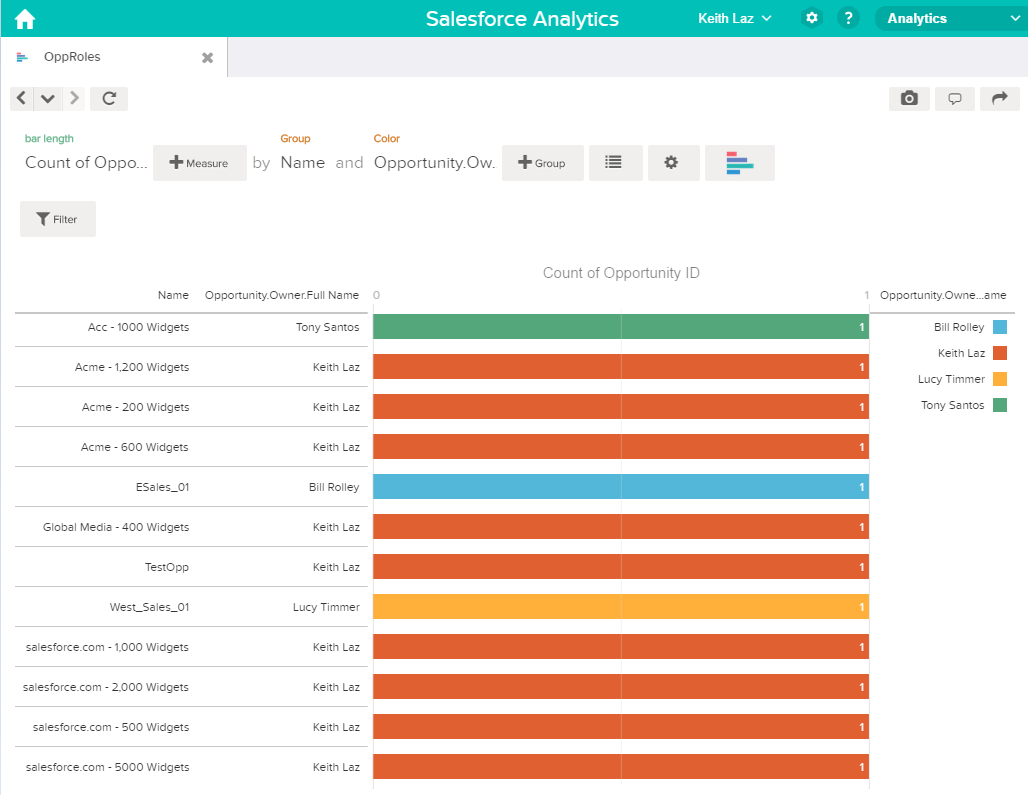
    As expected, Keith can still see all opportunities.
    
    ![Keith sees all opportunities given his role in the hierarchy.](https://sf-zdocs-cdn-prod.zoominsoftware.com/tdta-analytics-bi-264-0-0-production-enus/ec791473-f5b4-4f64-a656-9104f455d966/bi/images/bi/bi_opportunities_keith_predicate_opproles.png)