---
schema_version: "1"
id: 8c0f761f4a4e098467a2851f5b5eb7d9bfb22a9954a1542d79457624e4da5019
title: Apply Cardinality Recommendations to Your Semantic Model
collection: admin
version: current
locale: en-us
portal_url: https://docs.salesforce.com/admin/current/en-us/analytics/264-0-0/C360_sl_perf_reco_apply_cardinality_recommendations.md
canonical_url: https://help.salesforce.com/s/articleView?id=analytics.C360_sl_perf_reco_apply_cardinality_recommendations.htm&release=264.0.0&type=5
source_site: help.salesforce.com
content_type: documentation
content_hash: ca0039ea0d0ac261477c1b2dd2155b69ba374dd368479e0025aae5d1ad5419a0
description: Set a relationship's cardinality so queries skip extra deduplication. Review each suggestion, and then apply or dismiss it for this session.
products:
- Data 360
release: "264"
---
# Apply Cardinality Recommendations to Your Semantic Model
Set a relationship's cardinality so queries skip extra deduplication. Review each suggestion, and then apply or dismiss it for this session.
### Required Editions
Data Cloud Architect permission set AND Semantic Models object
See [Scan a Semantic Model for Performance Recommendations](https://help.salesforce.com/s/articleView?id=analytics.c360_sl_scan_model_perf_recommendations.htm&release=264.0.0&type=5 "Open Optimize Model to scan join settings on a semantic model. The scan returns a Model Health rating and a card for each recommendation type.") to start scanning your semantic model.
After a scan, cardinality recommends flag relationships that add deduplication to every query. Cardinality is how rows in two objects match: one-to-one, one-to-many, or many-to-many. Many-to-many adds deduplication and slows every query. Set one-to-one or many-to-one when the data matches so the engine skips that work. The right cardinality can speed queries by up to 50%.
Apply, review, or dismiss each cardinality recommendation for the current session. The suggested cardinality lets the query engine skip deduplication on that relationship.
1. On the Cardinality card, click **Review**.
2. In **Review Cardinality**, review the recommendations.
Each row shows the two objects in the relationship, the fields that join them, the row counts, and the current and suggested cardinality.
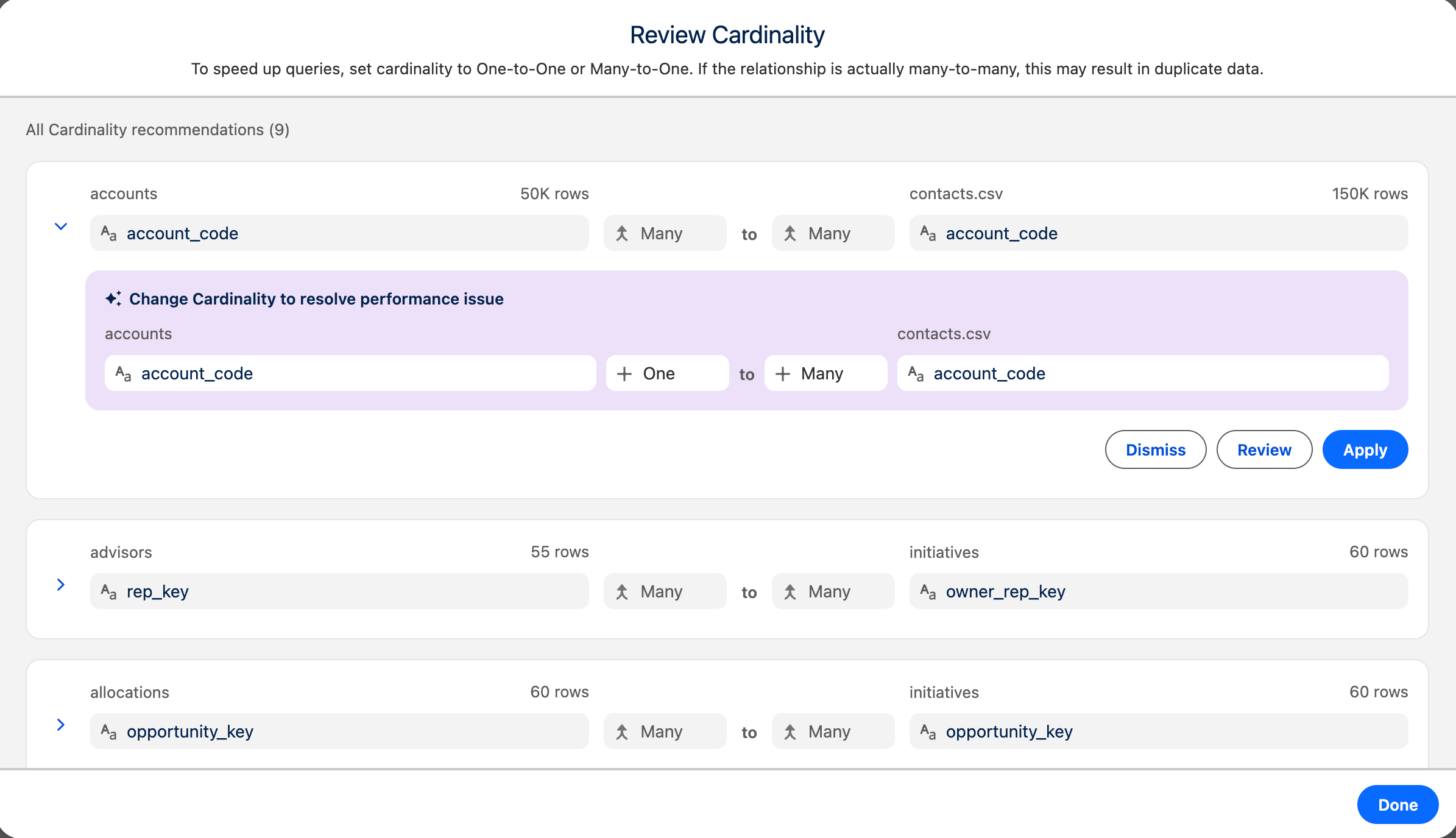
3. Expand the row to see the recommendation details.
The suggested change is highlighted and shows the recommended cardinality, such as **One to One**. When the relationship joins on more than one field, select **Show More Fields** and review every join field before you apply the change.
4. Select an action for the recommendation.
- **Apply**: Sets the relationship to the suggested cardinality. A confirmation message appears, and the relationship line updates on the model canvas.
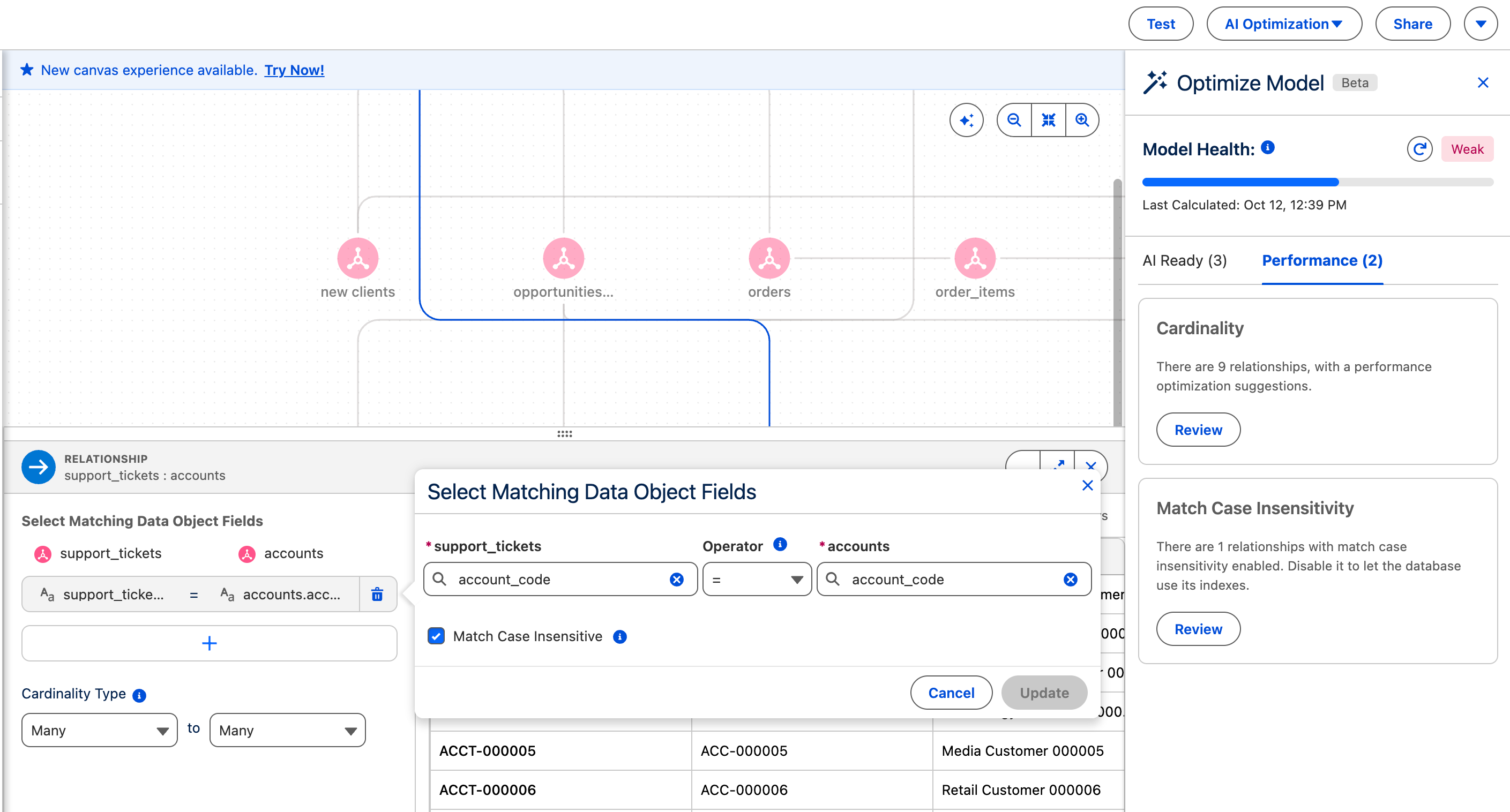
- **Review**: Opens the relationship detail view. The view shows the joined fields, the **Cardinality Type** setting, and a data preview of the joined objects. Confirm the relationship, set **Cardinality Type**, and click **Apply**.
- 
- **Dismiss**: Removes the recommendation for this session.
5. Repeat for the other recommendations in the list.
6. Click **Done**.
If the Match Case Insensitivity card lists joins, [Apply Match Case Insensitivity Recommendations to a Semantic Model](https://help.salesforce.com/s/articleView?id=analytics.c360_sl_perf_reco_apply_match_case_insensitivity_rec.htm&release=264.0.0&type=5 "Case-sensitive text joins slow queries when the values share one capitalization. Review each suggestion, and then apply or dismiss it for this session."). To undo an applied cardinality change, set **Cardinality Type** on the relationship.