
If the agent call is escalated to a rep, the agent is disconnected and the telephony system resumes the call. If supported, configure the telephony system to handle the escalated call, including resuming the call when it’s escalated and transferring the call to the appropriate rep.
To illustrate how this works with Real-Time Streaming, this topic describes how to accomplish this task using Salesforce Voice with Partner Telephony from Amazon Connect. Specifically, configure the Amazon Connect inbound flow to resume the call where it left off, which is after the original call is transferred to the agent, and route it to a service rep.
- In Amazon Connect Flow Designer, edit the inbound Amazon Connect flow.
- Select the Transfer to Phone Number block that you configured in Configure Inbound Call Transfers in the Telephony System.
- To resume the call after the Agentforce agent disconnects, in the Resume Flow After Disconnect field, select Yes and click Save.
-
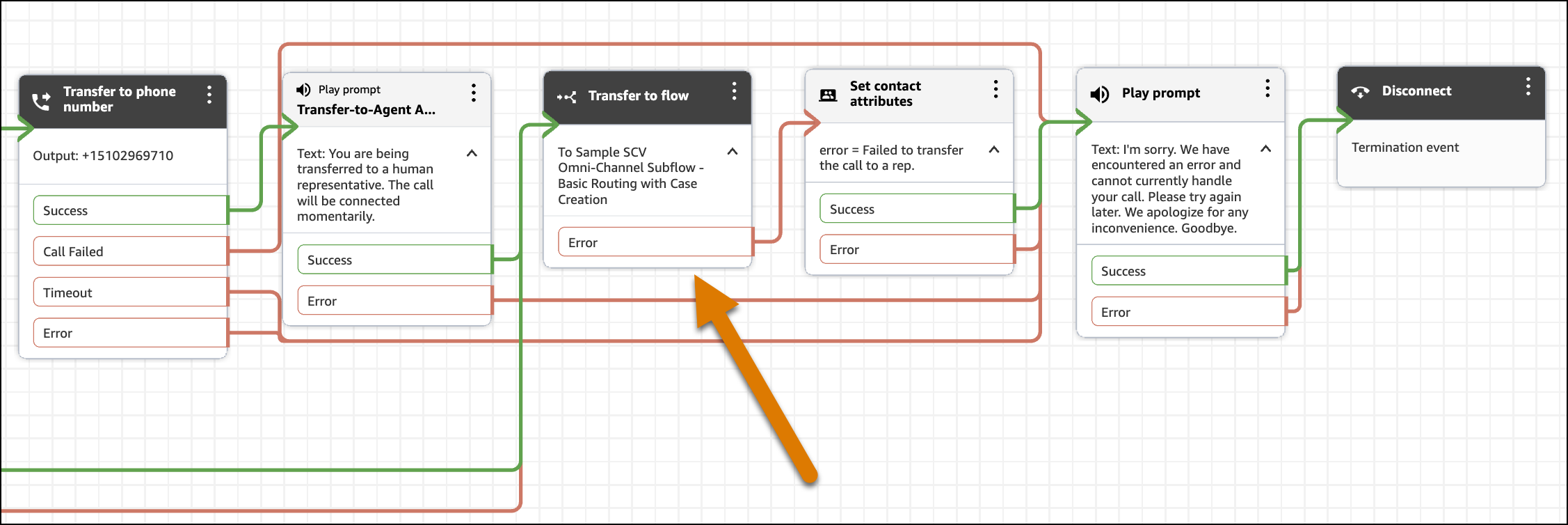
Configure the telephony logic to route the call. For example, to transfer the call to
an Omni-Channel flow that routes the call to a rep, add a Transfer to Flow block in the
Amazon flow.
- Save and publish the Amazon Connect flow.