
Standard lookups search through a limited set of searchable fields per object and users can’t refine search results.
Required Editions
| Available in: Salesforce Classic |
| Available in: All Editions except Database.com |
Availability
Standard lookups are available for most standard objects. All lookup fields use standard lookups by default.
Search Behavior
- When you perform a blank lookup, a list of recently viewed records displays in the lookup search dialog. For standard lookups, records are listed in alphabetical order by the primary record name field. For enhanced lookups, records are ordered according to when you last viewed them.
- Blank lookups for user records have slightly different behavior. If an admin selects Use Recently Viewed User Records for Blank and Auto-Complete Lookups on the Search Settings page, the user’s 200 most-recent records are returned and sorted in alphabetical order by first and last name. If this setting isn’t selected, the 200 most-recent records from across the org are returned and sorted in alphabetical order by first and last name. It also stops populating records when the 200 record limit is reached, due to search crowding.
- Standard lookups search selected Name fields for objects.
- A wildcard is appended to each of your search terms. For example, a search for bob jo is really a search for bob* jo* and returns items with bob jones, bobby jones, or bob johnson.
- Standard lookup queries match your search term against the org’s database (not the search index) without breaking up the term into separate tokens.
- Spell correction isn’t performed on search terms.
Search Results
Most standard lookups return up to 200 of the most-relevant records and allow you to page through 50 records at a time. Lookup searches for campaigns return only the top 100 results. If you’ve gone through all the results and still don’t see the desired record, enter a more specific search term.
Avoid result limits by making your search more specific. If lookup search results exceed the results limit, a user's most recently accessed records aren't included in their results. For example, a lookup search for Acme finds 205 matching results, which are prioritized in order from earliest to most recently accessed. That means 5 of the 205 matching records that aren't included in the results are the user's most recently accessed records.
Results are listed in alphabetical order by the primary record name field.
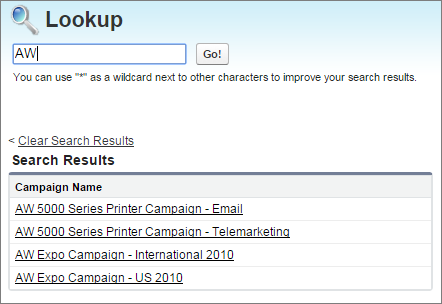
You can’t sort, filter, or customize the columns in the search results.
Salesforce returns matches for a custom object only if your admin has associated a custom tab with it. You don’t have to add the tab for display.
Consider converting standard lookups into enhanced lookups for better search results. Admins enable enhanced lookups.