
Enhanced lookups offer more search capabilities than standard lookups. In addition, enhanced lookups allow search result sorting and filtering.
Required Editions
| Available in: Salesforce Classic |
| Available in: All Editions except Database.com |
- Availability
- Enhanced lookups are available only for specific objects. Admins enable enhanced lookups for each object.
- Search Behavior
- When you perform a blank lookup, a list of recently viewed records displays in the lookup search dialog. If available, you can sort and filter recently viewed records. If you don’t see a record, perform a full lookup search.
-
By default, enhanced lookups query a limited set of
fields, primarily Name fields for each object. If available in the
enhanced lookup search dialog, select All Fields and enter
other search terms unique to the record, to search through all searchable
fields.

- Enhanced lookup search queries breaks down your search terms into tokens so that it can return records with matching tokens from the index.
- Spell correction isn’t performed on search terms.
- Search Results
- Enhanced lookups return up to 2,000 of the most relevant records and allow you to page through large sets of search results. If you’ve gone through all the results and still don’t see the desired record, enter a more specific search term.
- Results are initially presented in ascending alphabetical order by the primary record name field. Custom objects are listed in descending order by the date when you most recently accessed them.
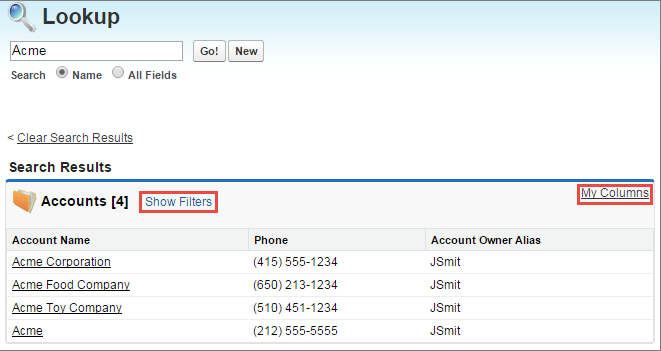
- Sort results by clicking on the column heading. Use Show
Filters to filter results. Use My Columns to change
which columns display in the search results.
 Note Admins must setup a search layout for the Lookup Filter Field before users can sort or filter results. Admins determine the available fields that appear as columns in the search layout. Although you can hide and organize the columns that appear in the layout with My Columns, you can’t add columns that aren’t included in the layout. So, contact your admin to request additional columns added to the layout.
 - Salesforce only returns matches for a custom object if your admin has associated a custom tab with it. You don’t have to add the tab for display.