As you type in the global search bar, a list of suggested records appears. Use these
instant results for quick record access. If you don’t see the record that you want in the list,
perform a full search.
Required Editions
| Available in: Salesforce Classic |
| Available in: All Editions except Database.com |
As you start typing, you see recent matching items and a search option.
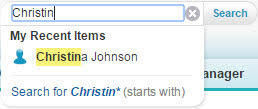
- Full Search—Searches across searchable objects and takes you to the search results
page.
- My Recent Items—Lists recently viewed items that match your search
term. Selecting an item takes you to its record page.
- Start With—Performs a full search for records that have partial matches for your term.
Enter a complete search term for more relevant results.
Instant results only appear for records within searchable objects.
The suggested records displayed are ones that you recently viewed or that include the search
term you entered. If you don't see the record you're looking for in the instant results, perform
a full search for more results.
Stop-words, such as how and to, are included in the instant results for these
objects.
- Account
- Campaign
- Case
- Contact
- Contract
- Custom objects
- Endorsement
- Fund
- Goal
- Lead
- Opportunity
- Order
- Reward
- Skill
- Topic
- User
