
Agents can customize article details and make quicker attachments to cases.
When viewing an article search result list, agents can see details about each article and easily identify if an article is relevant or not for their typed query. If an agent is solving a case, they can quickly attach an article to the case right from the search result list using the Attach button. Agents can also quickly identify the articles recommended by admins through the promoted result badge to help track the origin of that article. If there are no articles that agents can use to solve the case, users can select New Article and create an article to fill the knowledge gap.
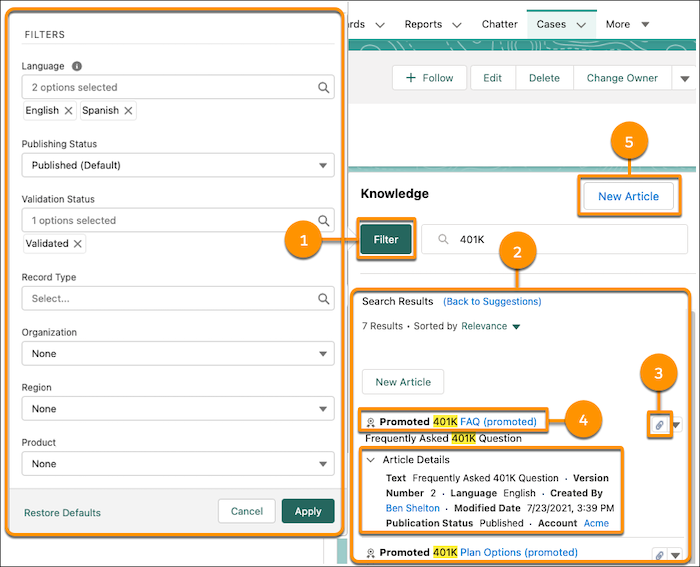
- Access search filters from the knowledge sidebar. They’re now easier to find, modify, and apply (1).
- View profile-based knowledge search results in a card view in the sidebar and global search bar. Users can see article details, snippets, and highlighted search terms. For more information on customizing search layouts, view Customize Search Layouts to Show Results Users Want (2).
- Attach an article to a case with one click (3).
- View clearly, the labeled articles promoted by content managers (4).
- Create an article and add it to the knowledge base (5).