
Explore the components in the Search Analytics Dashboard, including the data model objects (DMOs) and calculated insights (CIs) that power the data and what each chart or table shows.
Required Editions
| Available in: CRM Analytics and All Editions supported by Data Cloud. See Data Cloud edition availability. Search Analytics isn't available in Government Cloud. |
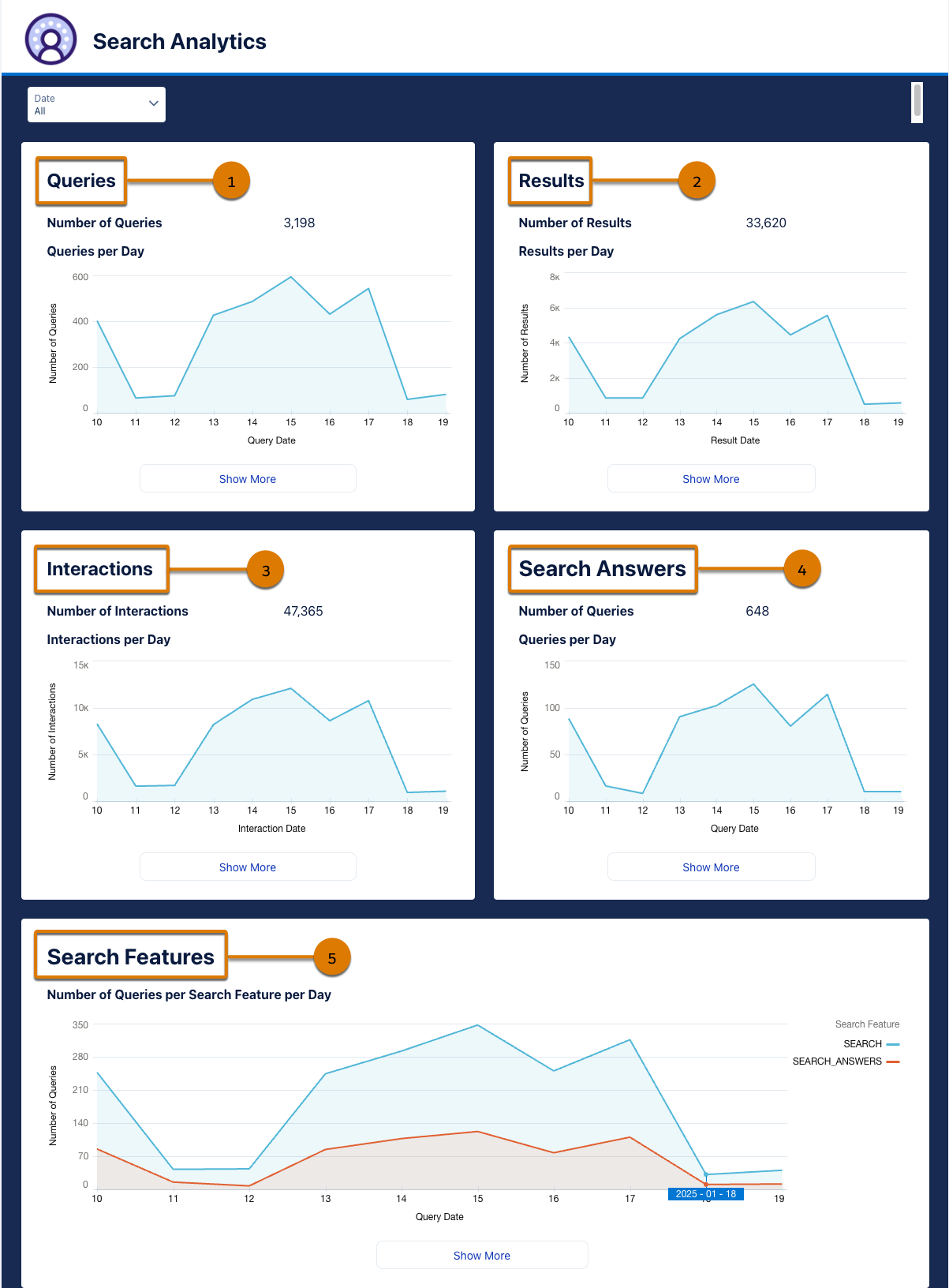
The Search Analytics Dashboard breaks down results into five sections:
- Queries (1)
- Results (2)
- Interactions (3)
- Search Answers (4)
- Search Features (5)
To see all components in each section, click Show More. To return to the main dashboard, click X in the top right corner.
While you can’t update or modify the Search Analytics Dashboard, you can clone it and edit the copy. You can also build custom reports and dashboards using the Search Analytics DMOs and CIs and your Search Analytics data. See Data Cloud Reports and Dashboards.
Queries
In addition to these components, the Queries section also shows the total number of queries.
| Component Name | Source of the Data | Information Included |
|---|---|---|
| Queries per Day | Search Queries DMO |
Chart of the number of queries per day.
|
| Most Searched Queries | Daily Most Searched Queries CI | Table of query text and the total number of times it was searched. |
| Number of Queries by Search Object Scope per Day | Search Queries DMO |
Chart of the number of search queries by search object scope. Search object scope indicates the object selected as the scope for the search, such as Account, Case, Lead, and so on.
|
| Number of Queries by Search Channel per Day | Number of Queries per Search Feature component |
Graph plot of the number of search queries by search channel or platform per day. Platforms include Experience Cloud, Global Search, and Knowledge Search Sidebar in Case Page.
|
Results
In addition to these components, the Results section also shows the total number of search results.
| Component Name | Source of the Data | Information Included |
|---|---|---|
| Results per Day | Search Results DMO |
Chart of the total number of results shown to users per day.
|
| Most Clicked Articles | Daily Interactions per Article CI |
Table of total number of clicks by article ID. Filter: Interaction Type == click |
| Percentage of Queries With Results per Day | Query Result Insights CI |
Chart of the percentage of queries with results per day.
|
| Articles by Mean Reciprocal Rank | Mean Reciprocal Rank by Article in Range CI |
Table of article IDs by Mean Reciprocal Rank (MRR). MRR evaluates the quality of a recommendation or results. A higher MRR indicates that users frequently engage with the top-ranked articles and suggests that Salesforce returns relevant content effectively. MRR is calculated over a time period defined in the CI SQL statement. To customize the time period, update the SQL statement. Filter: Interaction Type == click |
| Average Mean Reciprocal Rank by Search Channel | MRR by Article per Platform in Range CI |
Chart of the average MRR across search channels. MRR is calculated over a time period defined in the CI SQL statement. To customize the time period, update the SQL statement.
|
Interactions
In addition to these components, the Interactions section also shows the total number of interactions and the overall average number of interactions per article.
| Component Name | Source of the Data | Information Included |
|---|---|---|
| Interactions per Day | Search Interactions DMO |
Chart of total number of interactions per day.
|
| Most Interacted Queries | Daily Interactions per Query CI |
Table of query text and sum of interactions for that query term. You can use this information to identify popular search terms and optimize knowledge articles. |
| Percentage of Queries With Interactions per Day | Query Interaction Insights CI |
Chart of the percentage of queries with interactions per day.
|
| Interactions by Type per Day | Interactions per Search Feature CI |
Chart of the number of interactions by type, for all types of search features.
|
| Average Number of Interactions per Article | Avg Interactions per Article in Range CI |
Table of article ID and average number of interactions for that article. The average is calculated over a time period defined in the CI SQL statement. To customize the time period, update the SQL statement. |
| Average Number of Interactions per Article by Type | Avg Interactions per Type in Range CI |
Table of article ID and average number of interactions for that article by interaction type. The average is calculated over a time period defined in the CI SQL statement. To customize the time period, update the SQL statement. |
Search Answers
In addition to these components, the Search Answers section also shows the total number of Search Answers queries. If Einstein Search Answers or AI-Generated Search Answers isn’t enabled in your org, these charts don’t show any data.
Search Answers queries are queries that trigger Einstein Search Answers to provide a response. These queries can return:
- Responses, which show that Search Answers found knowledge articles that were relevant to the query and generated a response.
- Empty responses, which show that Search Answers couldn’t find relevant sources to generate an answer.
Use data about responses and empty responses to see the types of queries that don't return results so that you can address gaps in your knowledge base.
| Component Name | Source of the Data | Information Included |
|---|---|---|
| Queries per Day | Queries per Search Feature CI |
Chart of the total number of Search Answers queries per day.
|
| Most Popular Articles in Search Answers | Daily Article Search per Feature CI |
Table of the total number of queries an article ID is used for in Search Answers. Filter: Search Feature Type == SEARCH_ANSWERS |
| Number of Interactions by Type per Day | Interactions per Search Feature CI |
Total number of interactions by search feature in Search Answers.
|
| Top Queries with Search Answers | Search Answers Daily Frequency CI |
Table of query text and frequency of usage in Search Answers where there's at least one result. Filter: Answered == 1 |
| Top Queries with Empty Search Answers | Search Answers Daily Frequency CI |
Table of query text and frequency of usage in Search Answers where the number of results is 0. Filter: Answered == 0 |
| Precision | Search Answers Precision CI |
Chart of precision over time. Precision evaluates the accuracy of a recommendation or search system and tells you how many results are relevant.
|
| Coverage | Search Answers Coverage CI |
Chart of coverage over time. Coverage describes the ratio of Search Answers results to the queries eligible for Search Answers. A coverage close to 1 indicates that most queries that are eligible for Search Answers product results.
|
| Percent Positive and Negative Reactions to the Search Answers per Day | Search Answers Reactions CI |
Chart of the percentage of positive and negative reactions to Search Answers per day. A query reaction is positive if the user clicks or hovers in the result, gives the result a thumbs up, or clicks Show More. A query reaction is negative if the user gives the result a thumbs down. If the user doesn’t click or hover in the result, give the result a thumbs up or down, or click Show More, the query isn’t given a reaction rating.
|
Search Features
Search Features include the various ways users can search, for example, Global Search, Einstein Search, and Lookup Search.
| Component Name | Source of the Data | Information Included |
|---|---|---|
| Number of Queries per Search Feature per Day | Search Results DMO |
Chart of the number of queries by Search Feature.
|
| Number of Article Results per Search Feature per Day | Daily Article Search per Feature CI |
Chart of the number of article results by Search Feature.
|
| Interactions by Type per Search Feature per Day | Interactions per Search Feature CI |
Chart of the number of interactions by type by Search Feature.
|