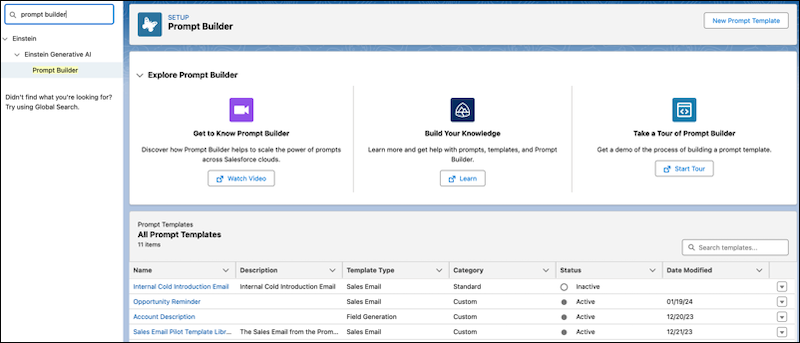
Enable Einstein in your organization and assign users the appropriate permission set to use Prompt Builder.
Required Editions
| User Permissions Needed | |
|---|---|
| To create and manage prompt templates in Prompt Builder: |
Prompt Template Manager permission set
OR Customize Application permission set |
| To run prompt templates using generative AI features: |
Prompt Template User permission set
OR Customize Application permission set |
| User Permissions Needed | |
|---|---|
| To create and manage prompt templates in Prompt Builder: | Prompt Template Manager permission set |
| To access and run prompt templates outside Prompt Builder | Prompt Template User permission set |

Note If you’re working from a scratch org, add Prompt Builder to your definition file before
enabling Einstein. See
Scratch Org Features.
- Follow Set Up Einstein Generative AI.
-
(Optional) To use prompt templates with sales emails, activate Sales Emails.
- From Setup, in the Quick Find box, enter Einstein Sales, and then select Einstein for Sales.
- Enable Sales Emails. It can take a few minutes before the feature is ready to use.
- Assign the Prompt Template Manager permission set to users that need to create and manage
prompt templates in Prompt Builder.
- From Setup, in the Quick Find box, enter Permission Sets, and then select Permission Sets.
- From the Permission Sets list view, click Prompt Template Manager.
- From the Prompt Template Manager detail page, click Manage Assignments and Add Assignments.
- Select the checkboxes next to the names of the users, including yourself, that you want assigned to the permission set, and click Next. To add a user to the Prompt Template Manager permission set, the user must have access to Setup.
- Click Assign.
Assign the separate Prompt Template User permission set for end users that need to access and run prompt templates. - Refresh the page so that Prompt Builder is now visible in Setup.
- To open Prompt Builder from Setup, in the Quick Find box, enter Prompt
Builder, and then select Prompt Builder.