
Customer conversations with the Help Agent can be escalated to a human service rep. By default, escalation is triggered when a customer explicitly requests to speak with a human or service rep.
If needed, you can customize the triggers in the Agentforce Builder. For example, you can configure escalation based on business rules or guardrails, such as when a question falls outside the agent's knowledge or goes unanswered multiple times. If an escalation is triggered but no rep is available, the Help Agent remains in the session and, by default, offers to create a support case.
For more information about the escalation, see Transfer Conversations from an Agent with an Omni-Channel Flow.
Escalation Path in the Conversation Lifecycle
This section describes the full lifecycle of a customer conversation, from the moment a contact is made, through the Help Agent, through escalation to a service rep, to resolution.
This diagram illustrates the full lifecycle of a customer conversation.
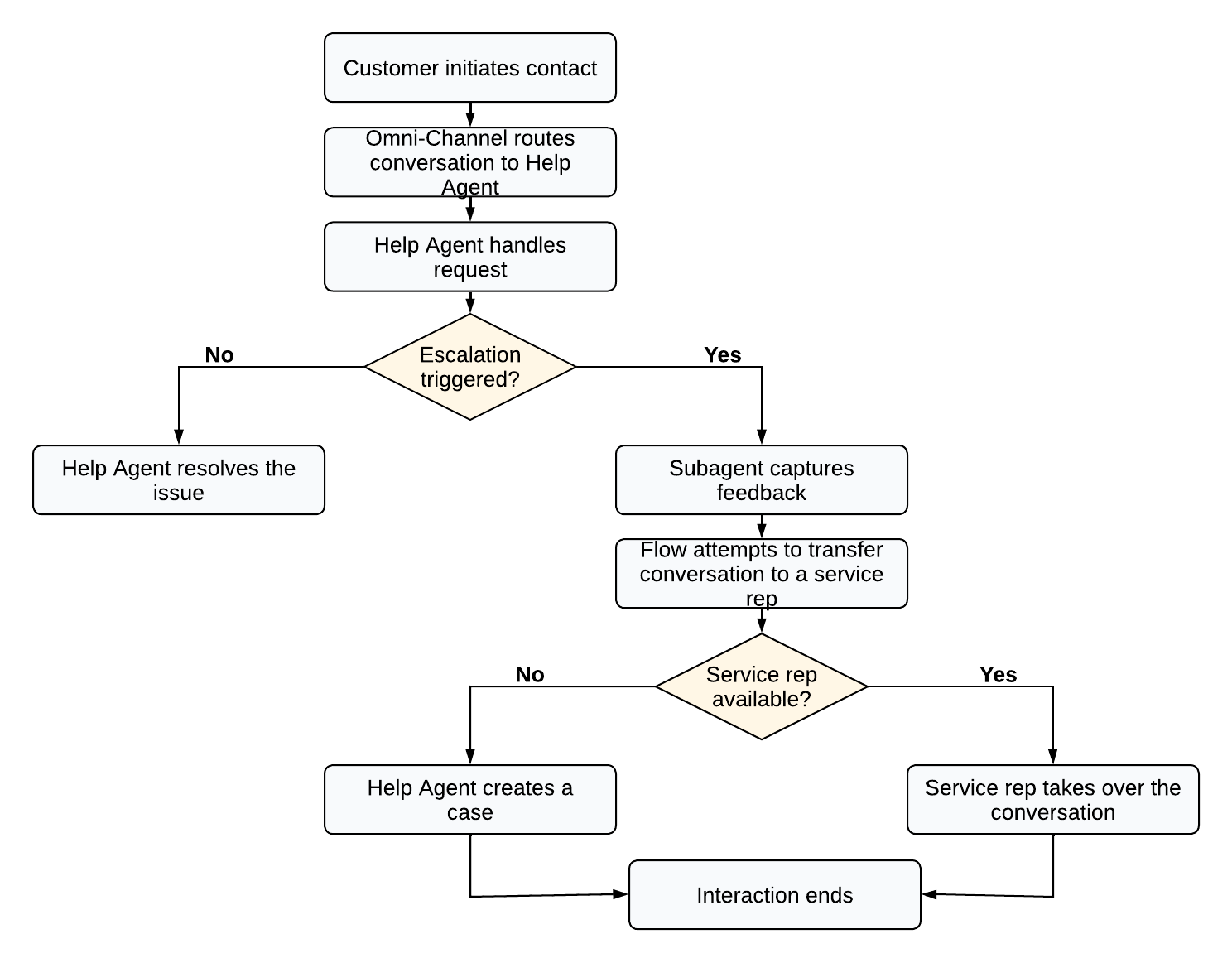
- Customer initiates contact. The customer contacts your organization through a supported channel, such as voice or web chat.
- Omni-Channel routes conversation to the Help Agent. Omni-Channel routes the conversation to the Help Agent via a queue.
- The Help Agent handles the request. The Help Agent accepts the conversation and begins handling the customer's request. The Help Agent interacts with the customer to understand and resolve their issue. To help the customer, the agent draws on its configured knowledge sources, subagent instructions, and available actions. Depending on configuration, it may retrieve knowledge articles, look up account details, create or update cases, or perform other actions.
- Escalation decision point. After the Help Agent handles the request, one of these
paths follows.
- The Help Agent resolves the customer issue. The Help Agent resolves the customer issue and the conversation ends. Escalation isn't triggered.
- Escalation triggers. When escalation triggers, the Escalation with Feedback subagent activates. This subagent contains the instructions that govern both the initial escalation attempt and any fallback behavior.
- Subagent captures feedback. If escalation triggers, before transferring the conversation to a rep, the Escalation with Feedback subagent prompts the customer for a satisfaction rating. This feedback is recorded against the conversation for resolution-based billing purposes.
- Flow attempts to transfer conversation to a service rep. The escalation flow
assigned to the Help Agent attempts to route the conversation to the specified queue. The
queue determines which service reps are eligible to handle the conversation. Before
attempting to transfer the work to a rep, the Check Queue Availability element in the
Omni-Channel flow determines if a rep is available.
 Important Until at least one rep is assigned to the queue and available, no escalation requests can be routed to a rep. By default, no reps are assigned to the default queue.
- The service rep takes over the conversation. If a service rep is available, the conversation transfers to them. The Help Agent exits the session. The service rep takes over and handles the customer directly.
- The Help Agent creates a case. When an escalation request can't be routed to
a service rep, the conversation reverts to the Escalation with Feedback subagent,
which contains the fallback instructions. During fallback, the Help Agent remains in
the session, informs the customer that the escalation was unsuccessful, and offers to
create a support case. Full context from the prior conversation is maintained
throughout the fallback. After fallback occurs, to prevent customers from repeatedly
triggering escalation, the escalation action is blocked for the rest of the session.
An escalation request can't be routed for the following reasons.
- No agent is available.
- The business is closed.
- The queue is full.
- The Help Agent isn't assigned an active escalation flow.
- The LLM times out.
Important To create a case for the customer, the customer must exist as a contact. If no contact record exists, the case isn't created.
- Interaction ends. The customer's issue is resolved by the Help Agent, handed off to and resolved by a service rep, or captured as a support case for follow-up.
For the default settings, like the default escalation flow and queue, see Customize Help Agent Default Settings. To change what the agent says during an escalation, see Adapt Escalation Instructions and Actions Based on Your Business Needs. To change how conversations are routed, see Customize Escalation Routing.