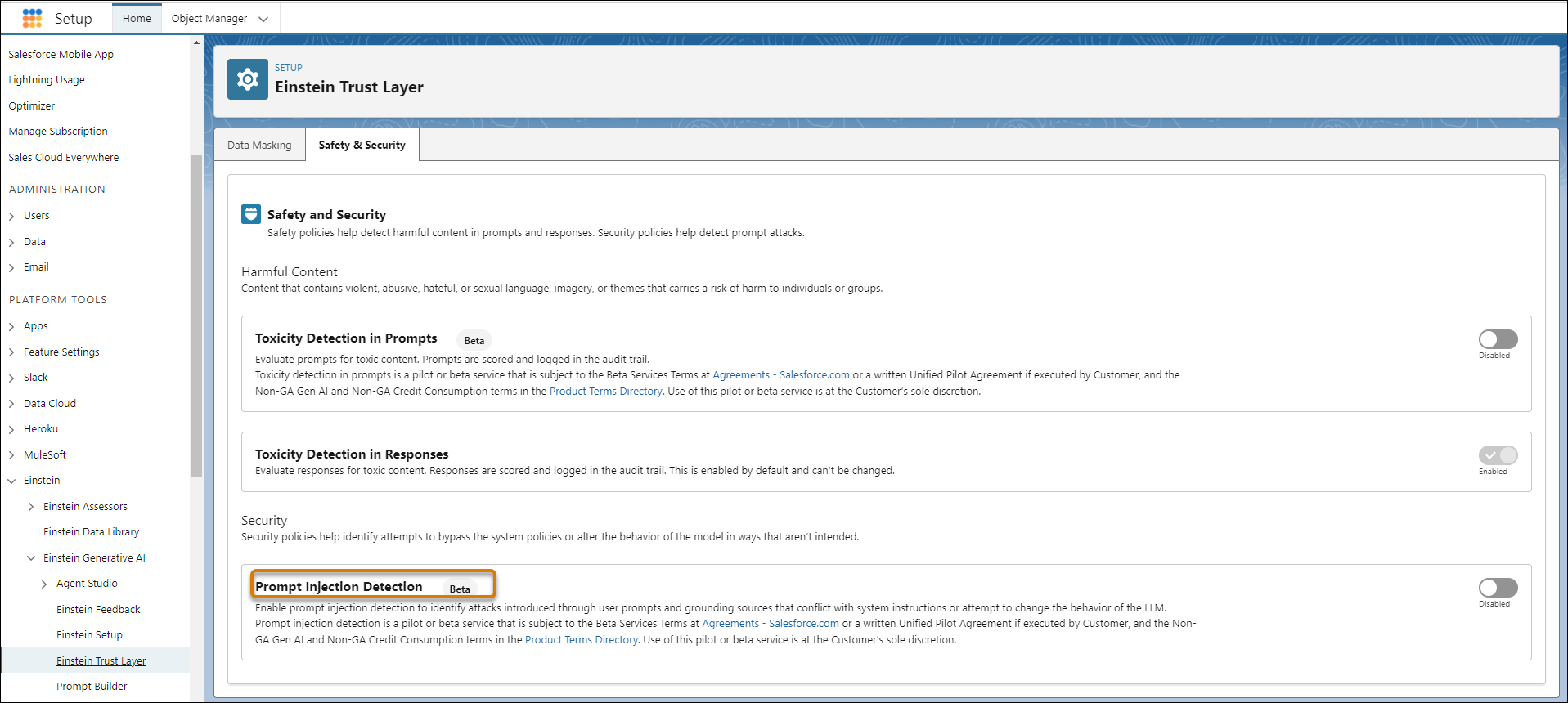
Turn on prompt injection detection in Einstein Trust Layer Setup to monitor content that attempts to make the large language model do something that it isn’t designed to do. These settings are applied at the Salesforce org level.
Required Editions
| Available in: Enterprise, Performance, and Unlimited Editions with an Einstein for Sales, Einstein for Platform, Einstein for Service, Einstein 1 Service, or Einstein GPT Service add-on. To purchase add-ons, contact your Salesforce account executive. |
| User Permissions Needed | |
|---|---|
| To turn on prompt injection detection: | View Setup |
| AND | |
| Customize Application | |
Einstein Generative AI must be enabled.

Note Prompt Injection Detection is a beta feature.
-
From Setup, in the Quick Find field, enter Einstein, and
then select Einstein Trust Layer.
Note If you can’t find Einstein Generative AI Setup, make sure that your org meets the prerequisites for any generative AI features you plan to use. For more support, contact your Salesforce account executive (AE).
- Click Safety & Security.
- Review the beta service terms. Turn on prompt injection detection.
- Use the reports and dashboards in Data 360 to see if prompt injections have been detected.