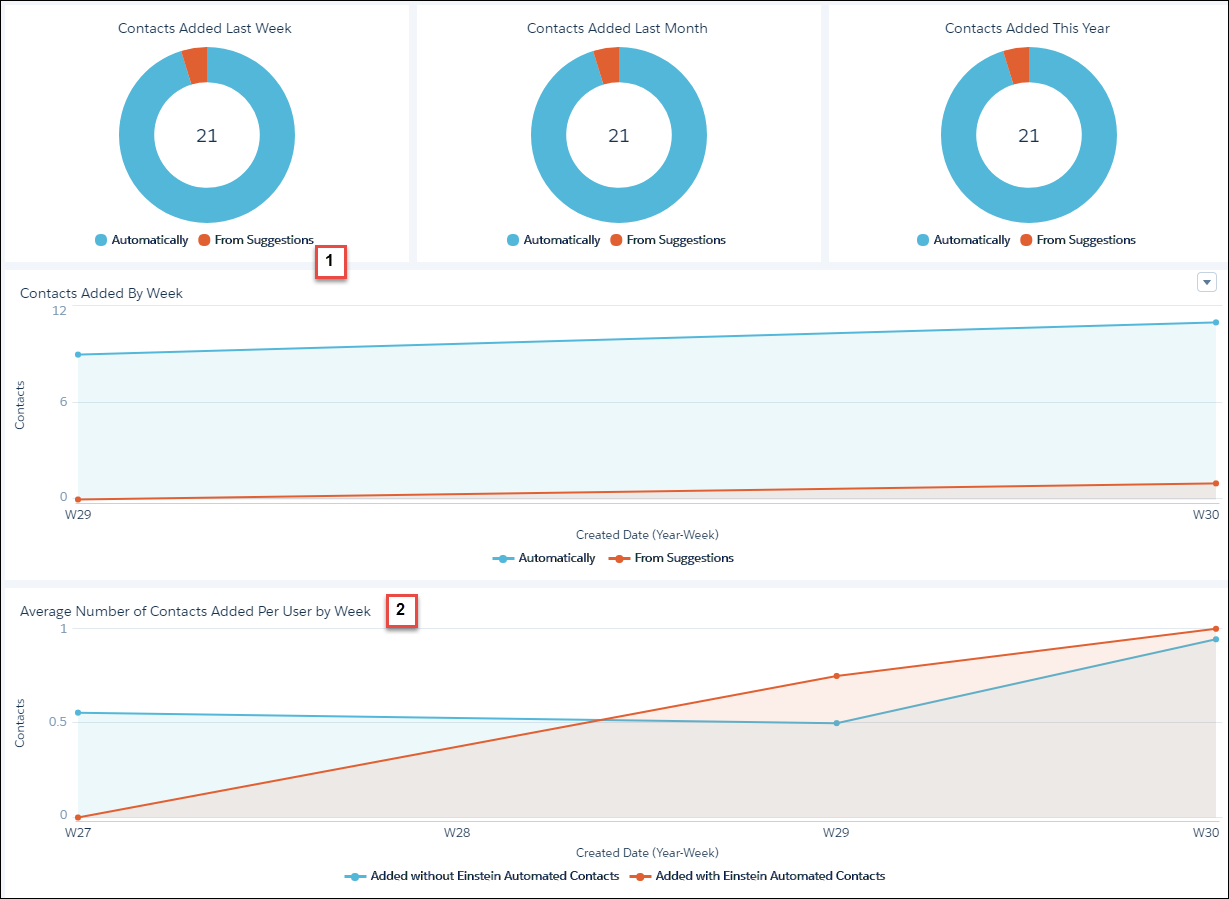
The CRM Analytics Automated Contacts dashboard provides Salesforce admins and sales managers with details about how effective Einstein is at finding and adding new contact records to Salesforce.
Required Editions
| Available in: Lightning Experience |
| Available with Sales Cloud Einstein, which is available in Performance and Unlimited Editions, and for an extra cost in Enterprise Edition |
| User Permissions Needed | |
|---|---|
| To view the CRM Analytics Automated Contacts app and dashboard: |
Use Einstein Automated Contacts AND Use CRM Analytics Templated Apps |
| To create CRM Analytics apps using the Einstein Automated Contacts app template: |
Use Einstein Automated Contacts AND Manage CRM Analytics Templated Apps |

To see the dashboard, your admin must set up Einstein Automated Contacts to have Einstein add data automatically. The dashboard includes only data that was added automatically.
- Click the Analytics tab or open the Analytics Studio.
- Find the Einstein Automated Contacts app.
- Review the Einstein Automated Contacts dashboard.
See how many contacts were added with the help of Einstein Automated Contacts, automatically or from suggestions. Data is broken down by week, month, and year. (1)
Compare how many contacts were added with and without Einstein Automated Contacts. Data is broken down by average number of contacts per user by week. (2)