
Utterance Analysis lets you quickly see how Agentforce (Default) users are using agents, what they’re requesting, and whether the agent was able to handle these requests. These customizable reports can help you refine your subagents and actions so that your agents respond more effectively and accurately.
Required Editions
| Available in: Lightning Experience |
| Available in: Enterprise, Performance, Unlimited, and Developer Editions. Required add-on licenses vary by agent type. |


Utterance Analysis is in the Agentforce (Default) folder in the Dashboard tab. The dashboard includes reports that track users, as well as the input and the agent response type. Reports are run on weekends and the dashboard is updated weekly.
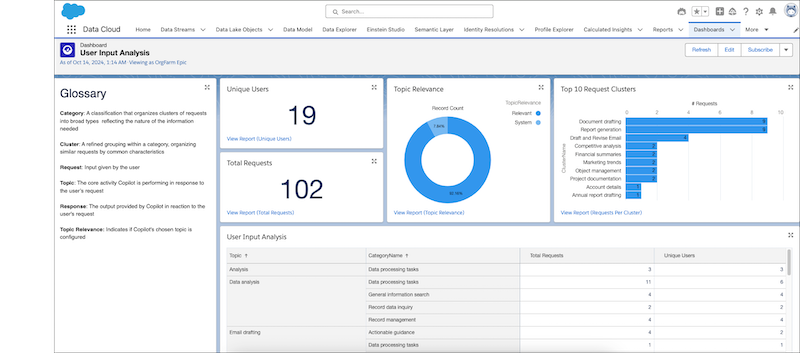
Utterance Analysis brings similar utterances together into Clusters. Those clusters are in turn grouped into Categories. By grouping information, you can see the overall trends of what users are asking for.
You can also do a reverse search and filter for unsupported requests, marked as system subagents, and see when an agent wasn’t able to create a meaningful response. This information helps to determine when to create subagents and actions that meet what users are requesting.
Utterance Analysis is built on Data 360 reports, which gives you the flexibility to customize it to suit your needs. But be sure to clone the report and modify the clone, not the original, to avoid breaking the analytics processes.