
When creating, testing, and managing voice-enabled agents consider the supported languages, usage and other limits.
Required Editions
| Available in: Lightning Experience |
| Available in: Enterprise, Unlimited, and Developer Editions with Foundations or Agentforce 1 Editions, and Salesforce Voice add-ons. |
Language Support for Voice
Persona for voice-enabled agents is available in several global languages. Languages in beta can have some inconsistencies when retrieving information, so plan to test your agent and review its responses carefully before deploying to production.
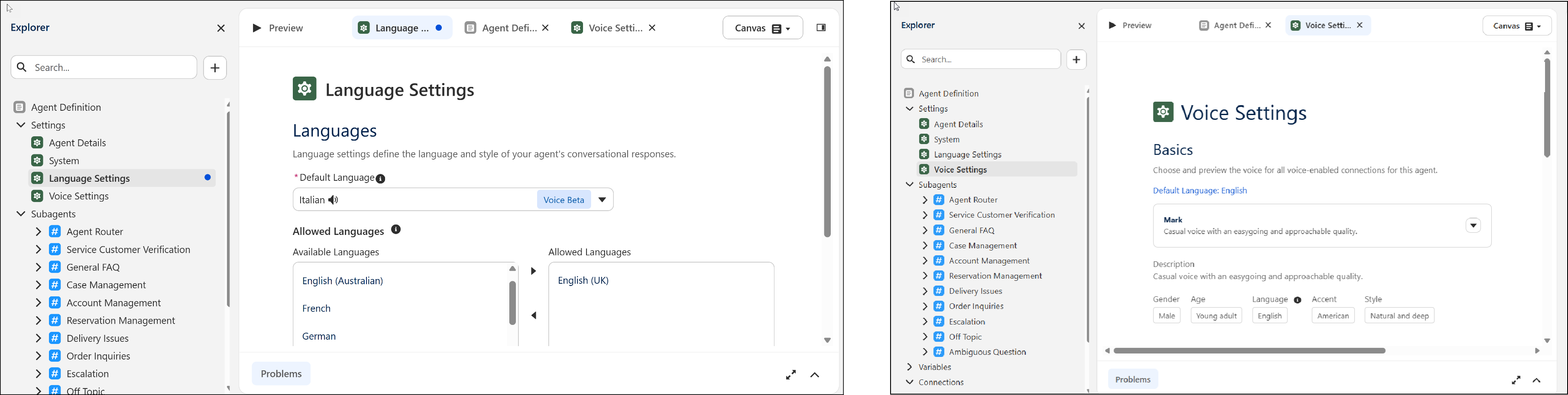
Agentforce Voice agents are monolingual. Each voice agent can only listen and respond in its configured default language in the Language Settings page. The default language also determines the language shown under Voice Settings. Verify that the agent's default language settings match the supported personas in Voice Settings when configuring your agent.

Even if you add languages to the Allowed Languages setting, a voice agent only operates in the Default Language. The Allowed Languages setting applies to text-based agents only.
Review Agentforce Language Support to learn about how language settings apply to agents in general.
| Language | Code | Notes |
|---|---|---|
| Arabic (Beta) | ar |
Limited support for advanced voice settings such as pronunciation dictionary. Not fully tested for quality and performance can vary. |
| Chinese - Mandarin (Beta) | zh_CN |
Limited support for advanced voice settings such as pronunciation dictionary. Not fully tested for quality and performance can vary. |
zh_TW |
Limited support for advanced voice settings such as pronunciation dictionary. Not fully tested for quality and performance can vary. | |
| Croatian (Beta) | hr |
Limited support for advanced voice settings such as pronunciation dictionary. Not fully tested for quality and performance can vary. |
| Czech (Beta) | cs |
Limited support for advanced voice settings such as pronunciation dictionary. Not fully tested for quality and performance can vary. |
| Danish (Beta) | da |
Limited support for advanced voice settings such as pronunciation dictionary. Not fully tested for quality and performance can vary. |
| Dutch (Beta) | nl_NL |
Limited support for advanced voice settings such as pronunciation dictionary. Not fully tested for quality and performance can vary. |
| English |
en_AU
|
Supports all available voice settings |
en_GB
|
Supports all available voice settings | |
en_US
|
Supports all available voice settings | |
| Finnish (Beta) | fi |
Limited support for advanced voice settings such as pronunciation dictionary. Not fully tested for quality and performance can vary. |
| French |
fr_CA
|
Limited support for pronunciation dictionary settings |
fr_FR
|
Limited support for pronunciation dictionary settings | |
| German | de_DE |
Limited support for pronunciation dictionary settings |
| Greek (Beta) | el |
Limited support for advanced voice settings such as pronunciation dictionary. Not fully tested for quality and performance can vary. |
| Hindi (Beta) | hi |
Limited support for pronunciation dictionary settings |
| Indonesian (Beta) | id | Limited support for advanced voice settings such as pronunciation dictionary. Not fully tested for quality and performance can vary. |
| Italian | it |
Limited support for pronunciation dictionary settings |
| Japanese | ja |
Pronunciation dictionaries, including Kana pronunciation dictionaries, aren't supported. On the Voice Settings page, the Play button for sampling a voice is disabled, but the Agentforce Builder Voice mode preview still works. |
| Korean (Beta) | ko |
Limited support for advanced voice settings such as pronunciation dictionary. Not fully tested for quality and performance can vary. |
| Malay (Beta) | ms |
Limited support for advanced voice settings such as pronunciation dictionary. Not fully tested for quality and performance can vary. |
| Norwegian (Beta) | no |
Limited support for advanced voice settings such as pronunciation dictionary. Not fully tested for quality and performance can vary. |
| Polish (Beta) | pl |
Limited support for advanced voice settings such as pronunciation dictionary. Not fully tested for quality and performance can vary. |
| Portuguese | pt_BR |
Limited support for pronunciation dictionary settings |
| Portuguese (Beta) | pt_PT |
Limited support for pronunciation dictionary settings |
| Romanian (Beta) | ro |
Limited support for advanced voice settings such as pronunciation dictionary. Not fully tested for quality and performance can vary. |
| Spanish | es_MX |
Limited support for pronunciation dictionary settings |
es_ES |
Limited support for pronunciation dictionary settings | |
| Swedish (Beta) | sv |
Limited support for advanced voice settings such as pronunciation dictionary. Not fully tested for quality and performance can vary. |
| Tagalog (Beta) | tl |
Limited support for advanced voice settings such as pronunciation dictionary. Not fully tested for quality and performance can vary. |
| Turkish (Beta) | tr |
Limited support for advanced voice settings such as pronunciation dictionary. Not fully tested for quality and performance can vary. |
Billable Usage Types
Agentforce can consume flex credits either through voice action usage types or voice minutes.
If your org has both Agentforce Voice Actions and Agentforce Voice Minutes enabled, Voice Minutes take precedence for billing. When Agentforce Voice Minutes are available, Salesforce meters Agentforce Voice Minutes only and doesn't apply Voice Actions usage types to the same activity.
| Billing Category | Description |
|---|---|
| Standard Voice Action |
Usage is determined by the number of standard actions executed by the agent in a voice conversation. Note Use of some standard agent actions require that a subscription has been purchased for
each user that accesses these actions, such as a subscription to Agentforce for Sales
Add-on or Agentforce for Service Add-on. To determine which subscription is required for
such standard actions, see Standard Action Reference at Standard Action Reference. While this
requirement is not technically enforced yet, users who don’t have the required add-on
license will lose access to such actions for which they don’t have a license when the
requirement is enforced.
|
| Custom Voice Action |
Usage is determined by the number of custom actions called by the agent in a voice conversation. Custom actions are actions that are created by you or which result from your modification of a standard action. To learn more about what customer created actions are, see Create a Custom Agent Action. To learn more about how standard actions become custom actions, see Editing Standard Agent Action Reference Actions. Async calls to Salesforce AI in custom action implementation may incur additional charges. |
| Agentforce Voice Minutes |
Usage is determined by the duration of the voice call between an end user and Agentforce Voice. Usage is rounded up to the next full minute, meaning any fraction of a minute is treated as a full minute. For example,
If your org has both Agentforce Voice Actions and Agentforce Voice Minutes enabled, Voice Minutes take precedence for billing. When Agentforce Voice Minutes are available in your org, only Agentforce Voice Minutes are metered, and Voice Actions usage types are not applied to the same activity. |
Usage Limits
- Service Continuity and Failover Strategy: To maintain service continuity, Agentforce Voice typically processes data within the Salesforce trust boundary by deploying Deepgram’s speech-to-text and ElevenLabs's and Kotoba text-to-speech models locally. If regional or availability-based rate limits are reached, the system fails over to the provider’s external infrastructure under a zero-data-retention policy.
- Concurrent Call Capacity and Routing: The default limit is 500 concurrent calls per org. To increase this limit, contact Salesforce Customer Support.
- Voice Call Record Generation: If you aren’t a Salesforce Voice with Telephony Providers customer, Salesforce creates a voice call record for the customer-agent conversation, but not for the customer-rep conversation. If you don’t set up Salesforce Voice with Telephony Providers, you can’t create a voice call record for the customer-rep conversation.
- SIP channel Activation Latency: If you deactivate and then reactivate a SIP Voice messaging channel, it can take up to 10 minutes before the change takes effect. During this delay, calls can be routed to a service rep, depending on how you configure the inbound call routing.
Sandbox Storage Limits
Sandbox environments have a 200-MB storage limit and call recordings can quickly reach this limit. When the storage limit is reached, the Omni-Channel stops working, blocking any further testing of Agentforce Voice until sufficient space is cleared.
To avoid storage issues, we recommend turning off call recording in sandbox environments. To turn off call recording, go to Setup, search for Agentforce Voice, and then turn off the Record Voice Calls with Agents option on the Agentforce Voice setup page.
If you run into storage limit issues, to reduce or clear the storage, use the bulk delete option to remove recording files. Removing recording files doesn’t always remove associated transcripts. See Delete Voice Call Customer Data and the bulk delete section in Work With Large Data Sets.
To test Agentforce Voice in an environment similar to production, we recommend a full or Partial Copy sandbox with larger storage.
Related Voice Calls
When a call is transferred to Agentforce Voice, the linkage between the original and transferred VoiceCall records requires the original caller's phone number to be preserved as the caller ID. If a different caller ID is presented during the transfer, Salesforce can’t link the VoiceCall records for the related call legs. For example, if you specify a Caller ID number in the Transfer to Phone block of an Amazon Connect flow, the transferred leg arrives in Salesforce with the AWS Connect number as the caller identity instead of the original caller's phone number. Because call linking relies on matching the original caller's number across both legs of the call, this mismatch prevents Salesforce from associating the source VoiceCall record with the Agentforce VoiceCall record.