---
schema_version: "1"
id: eb36baa375fcd9c6b20cc6393fc1deba5eac040f8370c1a5a5111573b81ffe2c
title: Turn Off Conversational Memory for Your Org
collection: admin
version: current
locale: en-us
portal_url: https://docs.salesforce.com/admin/current/en-us/ai/264-0-0/agent_memory_toggle_conversation_memory.md
canonical_url: https://help.salesforce.com/s/articleView?id=ai.agent_memory_toggle_conversation_memory.htm&release=264.0.0&type=5
source_site: help.salesforce.com
content_type: documentation
content_hash: 13e77be56361ecd81b29f660fd9e6388e447f6df40e6c2bd07114feff66a23cf
description: Turn off conversational memory for all AI agents in your org at once, instead of one by one.
products:
  - Agentforce
  - Cross Cloud
release: "264"
---
# Turn Off Conversational Memory for Your Org

Turn off conversational memory for all AI agents in your org at once, instead of one by one.

### Required Editions

<table class="slds-table slds-table_bordered slds-max-medium-table_stacked slds-m-bottom_small edition"><colgroup><col></colgroup><tbody><tr class=""><td class="slds-cell-wrap" style="vertical-align:top;">Available in: Lightning Experience</td></tr><tr class=""><td class="slds-cell-wrap" style="vertical-align:top;">Available in: <strong>Enterprise</strong>, <strong>Performance</strong>, <strong>Unlimited</strong>, and <strong>Developer</strong> Editions. <a href="https://help.salesforce.com/s/articleView?id=ai.agent_setup_explore_types.htm&amp;release=264.0.0&amp;type=5" title="Learn about agent types and default templates for specific clouds and common use cases.">Required add-on licenses vary by agent type.</a></td></tr></tbody></table>

<table class="slds-table slds-table_bordered slds-max-medium-table_stacked slds-m-bottom_small permission">
        <colgroup>
          <col style="width:50%">
          <col style="width:50%">
        </colgroup>
        <thead class="slds-text-title_caps ">
          <tr class="">
            <th scope="colgroup" class="slds-cell-wrap" colspan="2" style="text-align:center;vertical-align:top;" id="d44320e78">User Permissions Needed</th>
          </tr>
        </thead>
        <tbody>
          <tr class="">
            <td data-label="User Permissions Needed" class="slds-cell-wrap" style="vertical-align:top;" headers="d44320e78 ">To turn off conversational memory:</td>

            <td class="slds-cell-wrap" style="vertical-align:top;" headers="d44320e78 ">View Setup</td>

          </tr>
          <tr class="">
            <td data-label="User Permissions Needed" class="slds-cell-wrap" style="vertical-align:top;" headers="d44320e78 ">&nbsp;</td>

            <td class="slds-cell-wrap" style="vertical-align:top;" headers="d44320e78 ">AND</td>

          </tr>
          <tr class="">
            <td data-label="User Permissions Needed" class="slds-cell-wrap" style="vertical-align:top;" headers="d44320e78 ">&nbsp;</td>

            <td class="slds-cell-wrap" style="vertical-align:top;" headers="d44320e78 ">Customize Application</td>

          </tr>
        </tbody>
      </table>

Conversational memory is on by default. When you turn it off, AI agents stop creating memories and using existing ones, even if individual agents have Agent Memory enabled. Agentforce preserves existing memories but doesn't use them while the setting is off. The Memory & Preferences icon also disappears from the Agentforce panel.

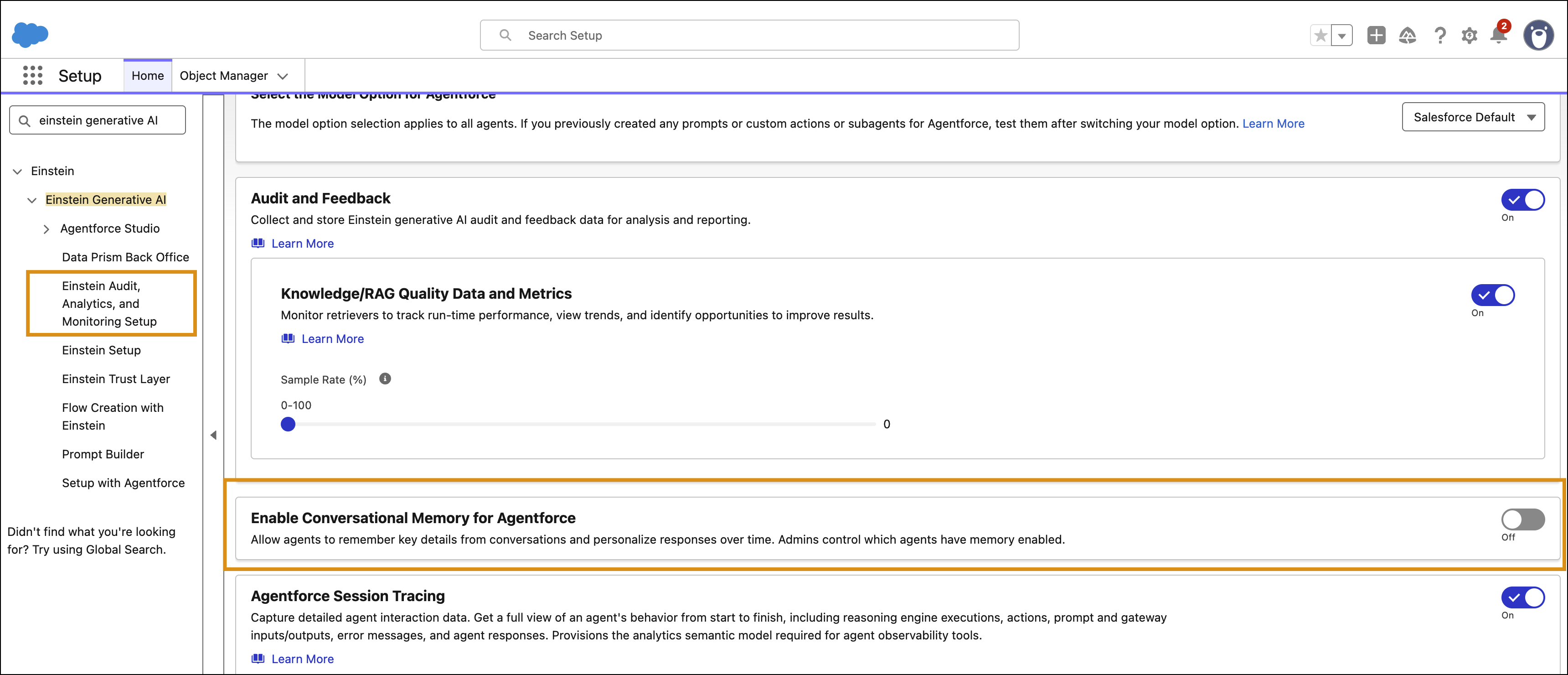
1. From Setup, in the Quick Find box, enter Einstein Generative AI, and then select **Einstein Audit, Analytics, and Monitoring Setup**.
2. Turn off **Enable Conversational Memory for Agentforce**.
    
    ![Einstein Audit, Analytics, and Monitoring Setup page with the Enable Conversational Memory for Agentforce toggle turned off.](https://sf-zdocs-cdn-prod.zoominsoftware.com/tdta-ai-generative_ai-264-0-0-production-enus/f8ef6498-d7b2-44e3-9b34-ffd5a850aae9/generative_ai/images/agent_memory_toggle_conversation_memory.png)