
Agentforce Service agents can autonomously respond to customer email inquiries. For example, if a customer emails you asking when their package will arrive, your agent can respond to them with the estimated delivery date and tracking number. Email responses are grounded in your Agentforce Data Libraries.
Required Editions
| Available in: Lightning Experience |
| Available in: Enterprise, Performance, Unlimited, and Developer Editions. Required add-on licenses vary by agent type. |
|
To learn about channel support for other agent types, see the documentation for that type. |


| User Permissions Needed | |
|---|---|
| To create email templates: | Lightning Experience User |
| To edit public email templates: | Modify All Data, Manage Public Lightning Email Templates, or template ownership |
| To create Agentforce Service Agent email configurations: | Manage Agentforce Service Agents AND Manage AI Agents OR Customize Application |
| To edit routing addresses: | Customize Application |
| To create Omni-Channel flows: | Customize Application |
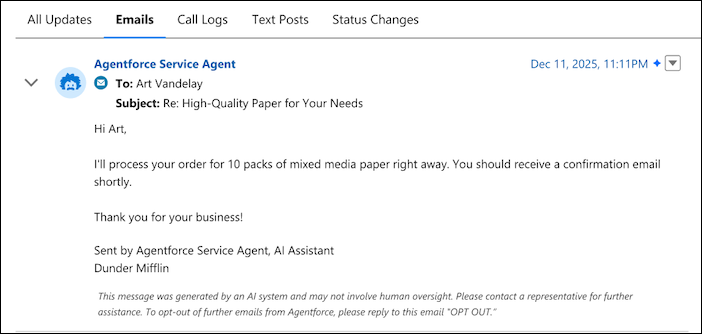
When an Agentforce Service agent emails a customer, the Sender field shows the Email-to-Case routing address to which their email was sent. The email includes a custom legal disclosure indicating that it was written using AI, and customers can request that their inquiry be escalated to a service rep. The email structure is based on a template that you create, and its content is determined by the subagents, actions, and instructions that you add to your agent. An Omni-Channel flow controls when your agent can email customers, or you can use a basic alternative to a flow. You can monitor emails sent by your Agentforce Service agent in a custom report, and they also appear in the case feed like any other case email.
To get started with Agentforce for Service on Email, complete several key pre-setup tasks.
- Enable Flex Credits.
- Create an Agentforce Service agent. Then select a data source to ground its responses, and activate the agent. Agentforce Service Agent on Email won’t be visible in Setup until you enable Agentforce.
- If your agent includes a user verification subagent, remove it from the agent. Agentforce Service Agent on Email doesn’t support end-user verification.
- Turn on and configure Email-to-Case, and add one or more verified routing addresses.
- Enable Lightning threading for emails. Learn more.
- Considerations for Agentforce Service Agent on Email
Some features aren’t supported in Agentforce Service Agent on Email. Review considerations and limitations for this tool. - Create an Email Template for Agentforce Service Agent on Email
Create a Lightning email template that defines the structure of all emails sent by your Agentforce Service agent. Classic email templates are not supported. - Create an Email Configuration for Agentforce Service Agent on Email
The email configuration connects your email template to an Agentforce Service agent. Create it in Setup, and then link it to one or more routing addresses. - Update Your Routing Logic for Agentforce Service Agent on Email
Nearly all of the puzzle pieces are in place, but Salesforce still needs to know when the agent should use your email template to email customers. We recommend creating an Omni-Channel flow that controls which cases are routed to your Agentforce Service agent versus a service rep. - Test Agentforce Service Agent on Email
If you’re using an Omni-Channel flow for routing, test your flow with a new unused routing address. Then, switch to an active routing address when you’re ready. - Monitor Emails Sent by an Agentforce Service Agent
To view and monitor emails sent by an AI agent, create a custom report or check the case feed for a specific case. - Use Custom Variables for Agentforce Service Email
Agentforce Service Agent now passes inbound email context, such as the Case ID, into custom variables instead of bundling it with the user message. You can reference these variables in your topics and action inputs for more reliable automation.